ProBase Features
Get More Google Reviews for Your Lawn Care Business
Automated, all season.
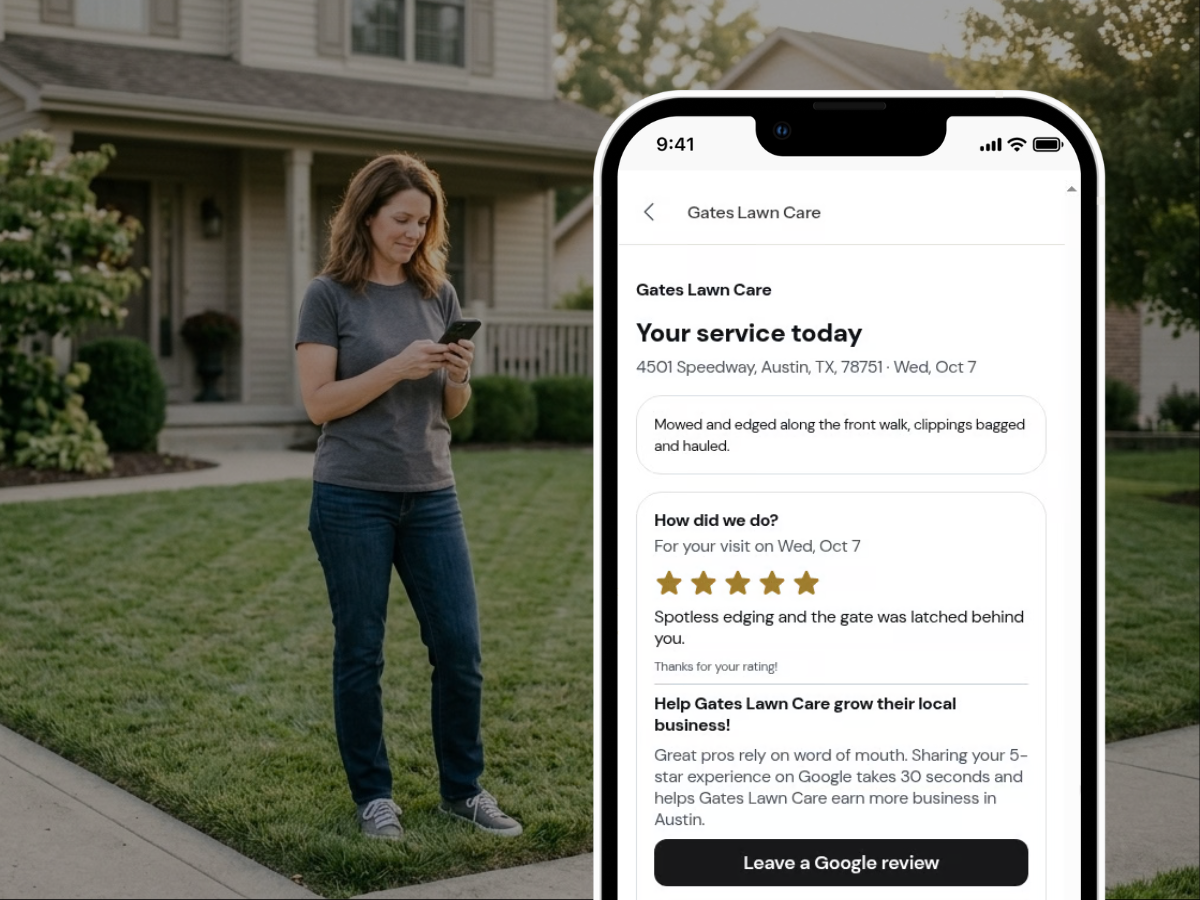
Automated reviews is a free feature of ProBase lawn care and landscaping software. Your customers are automatically asked to rate every visit on the service report you send, with a one-tap link to review you on your Google Business Profile.
Create My Free AccountThe street already knows your work. Google doesn't.
Lawn care happens in the open. The neighbors see the clean edges and the leaves gone by Saturday, and plenty of your customers came from someone next door asking who does that yard. That's word of mouth, and it works.
The online version is a Google review, and it almost never happens on its own. You finish a mow, the customer's at work, and you're already loading the trailer. Asking in person feels awkward. You mean to text a review link tonight, and tonight you're catching up on invoices. The customers who'd happily say something never get around to it.
Meanwhile a homeowner two streets over searches "lawn care near me" and gets a list of names. If you want more of those customers, your reviews need to be there.
How Google reviews help lawn care businesses get found
Google says "Local results are mainly based on relevance, distance, and popularity," and on prominence: "Prominence means how well-known a business is… This factor's also based on info like how many websites link to your business and how many reviews you have. More reviews and positive ratings can help your business's local ranking." (Google Business Profile Help) That's part of what decides who shows up in the map results (the "local pack") when someone searches "lawn care near me."
People check how many reviews you have and how recent they are. "47% of consumers won't use a business with fewer than 20 reviews, and only 9% are willing to use one with five or fewer." And "74% seek reviews written in the last three months." (BrightLocal Local Consumer Review Survey 2026)
Lawn customers also stay put. For lawn care, plumbing, or HVAC, 43% of homeowners "said they either rarely or never seek out a new provider" (Tinuiti Home Services Marketing Study). Once you win a yard, you tend to keep it, so being easy to find matters most on the day a homeowner does go looking.
Sources: BrightLocal Local Consumer Review Survey 2026; Tinuiti Home Services Marketing Study.
How Google review requests work in ProBase lawn care software
Connect your profile once.
In Business > Integrations, open the Google Business Profile card and tap Connect Google Business Profile. Search your business name as it appears on Google Maps. No Google login. Service-area businesses that hide their address work fine.
Send the service report after the visit, like you do now.
ProBase doesn't send anything extra.
Your customer rates the visit.
The report asks "How did we do?" with 1 to 5 stars and an optional comment. With Require a star rating before payment on (the default), the invoice also asks "How was your service?" and they continue to payment right after rating.
A one-tap Google link.
Your customer sees a card that reads "Help [Your Business Name] grow their local business!" with a Leave a Google review button that opens Google's review page for your business. If they typed a comment, Copy my words copies it so they can paste it into Google.
Nobody gets nagged.
Once a customer taps Leave a Google review, ProBase never shows them the Google ask again.
Build reviews in summer. Be found in spring.
Searches for "lawn care near me" climb from February, peak in April, and stay high through June (Google Trends). That's when the most homeowners are looking.
You can't collect a season's worth of reviews in March. They come in one yard at a time, after real visits. With a rating request on every report you send, they build through mowing season without a separate text. Since "74% seek reviews written in the last three months" (BrightLocal), a steady flow keeps your profile current.
The natural moments are the ones customers notice: the spring cleanup, the first mow of the season. The whole street sees the yard that day. A review lets the next street see it too.
Lawn care is a crowded field. On a search page, good operators with a truck and a trailer can look alike. Recent reviews from real customers are how a homeowner tells them apart.
When homeowners are looking
- February: searches start to climb
- April: the peak
- June: still high
Your Google rating, inside ProBase
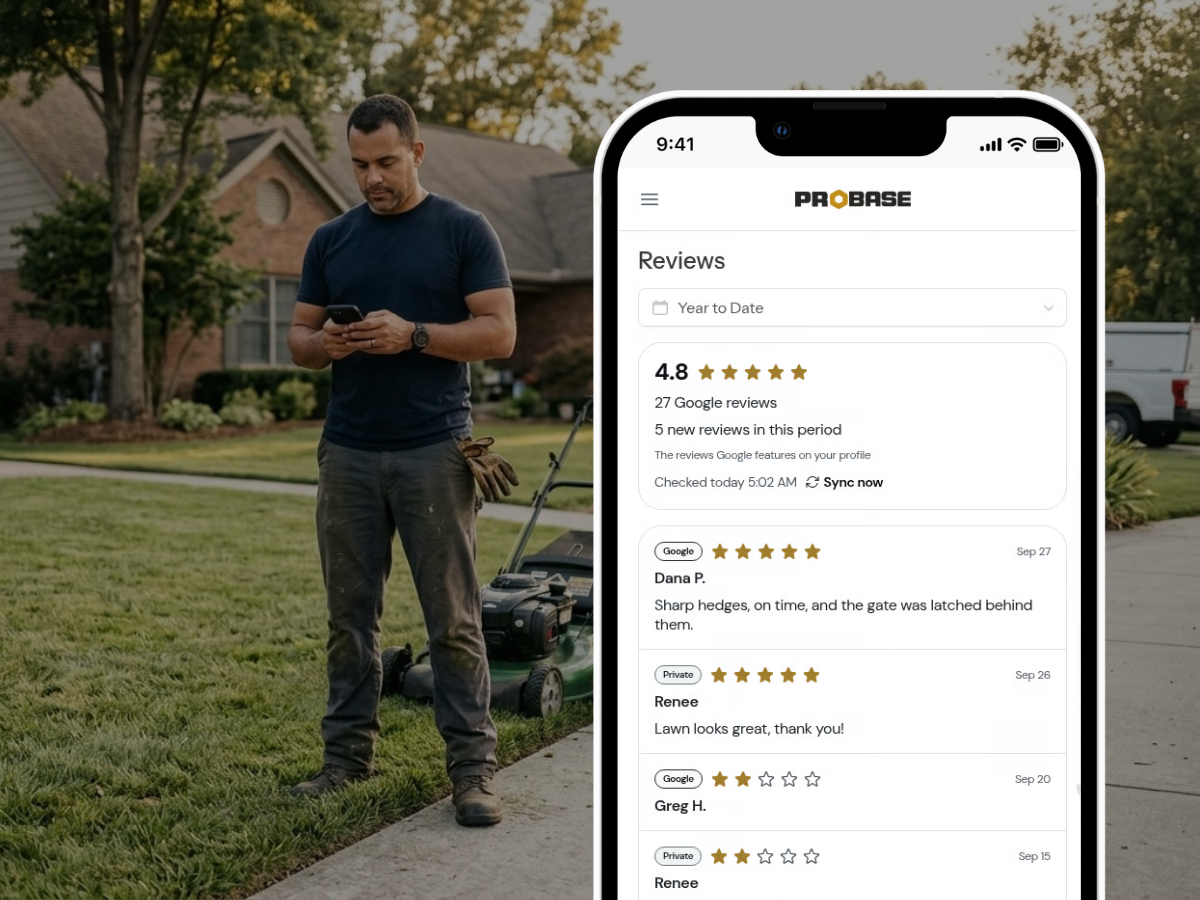
Open Reviews under Business to track your Google star average and review count through the season, plus new reviews this period and when ProBase last checked. One list shows Google reviews (marked "Google") with your ProBase visit ratings (marked "Private"). ProBase checks Google once a day, or tap Sync now. New Google reviews also show up in your updates feed.
Worth knowing: you can't reply to Google reviews from ProBase. Replies happen in Google. And the list shows the reviews Google features on your profile, not every review, though your count and average are complete.
What it doesn't do
It doesn't text or email your customers anything new.
It doesn't post to Google for you.
It doesn't need a website. No Google profile yet? Setup links to Create one on Google, free at Google.
It doesn't skip cash or check customers. If you send the service report, they see it.
It doesn't cover Yelp or Facebook. Google only.
It doesn't cost extra. Jobber's Reviews feature is a $39/month add-on (Jobber help center). ProBase's is free.
It isn't locked on. Turn off the Google review request in Business > Payments > Reviews any time.
Works even better with...
Common questions
Answers to what lawn pros ask most.
Build your reviews this season. Be there next spring.
If you want more yards on the route, the rating request is already on every report you send. Free, like everything else in ProBase.
Create My Free Account