Your customers would happily review you. They never get around to it.
Most pool routes are built on word of mouth. A customer tells the neighbor, and the route fills in one pool at a time.
Online, word of mouth is a Google review, and it rarely happens on its own. You finish the last stop hot and done, and the customer wasn't home. Asking feels like asking for a favor, so you mean to text the link tonight. Tonight you're doing invoices. The customers who'd gladly write something never get around to it.
So your Google Business Profile (formerly Google My Business) has a few old reviews, or doesn't exist yet. The next homeowner who searches "pool service near me" reads whatever's there.
How Google reviews help your pool service show up in Google Maps
Google says local results are mainly based on relevance, distance, and popularity, and that "More reviews and positive ratings can help your business's local ranking." (Google Business Profile Help)
You can't change how far you are from a homeowner. Reviews are the part you can build. They show next to your Business Profile in Maps and Search, including the short map list at the top of local results (the "local pack").
Homeowners read them. In a survey of more than 1,000 US homeowners, "86% of respondents said they start their search online," and "Google reviews were consulted by 64% of respondents" (Tinuiti Home Services Marketing Study). Google also says Business Profiles "can help… to be visible in both AI responses and other Google Search results" (Google Search Central).
And people say yes when you ask: "83% of people asked to leave a review went on to leave one" (BrightLocal Local Consumer Review Survey 2026). Your customers will leave the review. Someone just has to ask.
Sources: Tinuiti Home Services Marketing Study (1,000+ US homeowners); BrightLocal Local Consumer Review Survey 2026.
How ProBase asks pool customers for Google reviews
Connect your Google Business Profile.
Go to Business > Integrations, find the Google Business Profile card, and tap Connect Google Business Profile. Search your business name as it shows on Google Maps. No Google login or password.
Send your service report like you already do.
Readings, photos, and notes go out the same as always.
Your customer rates the visit.
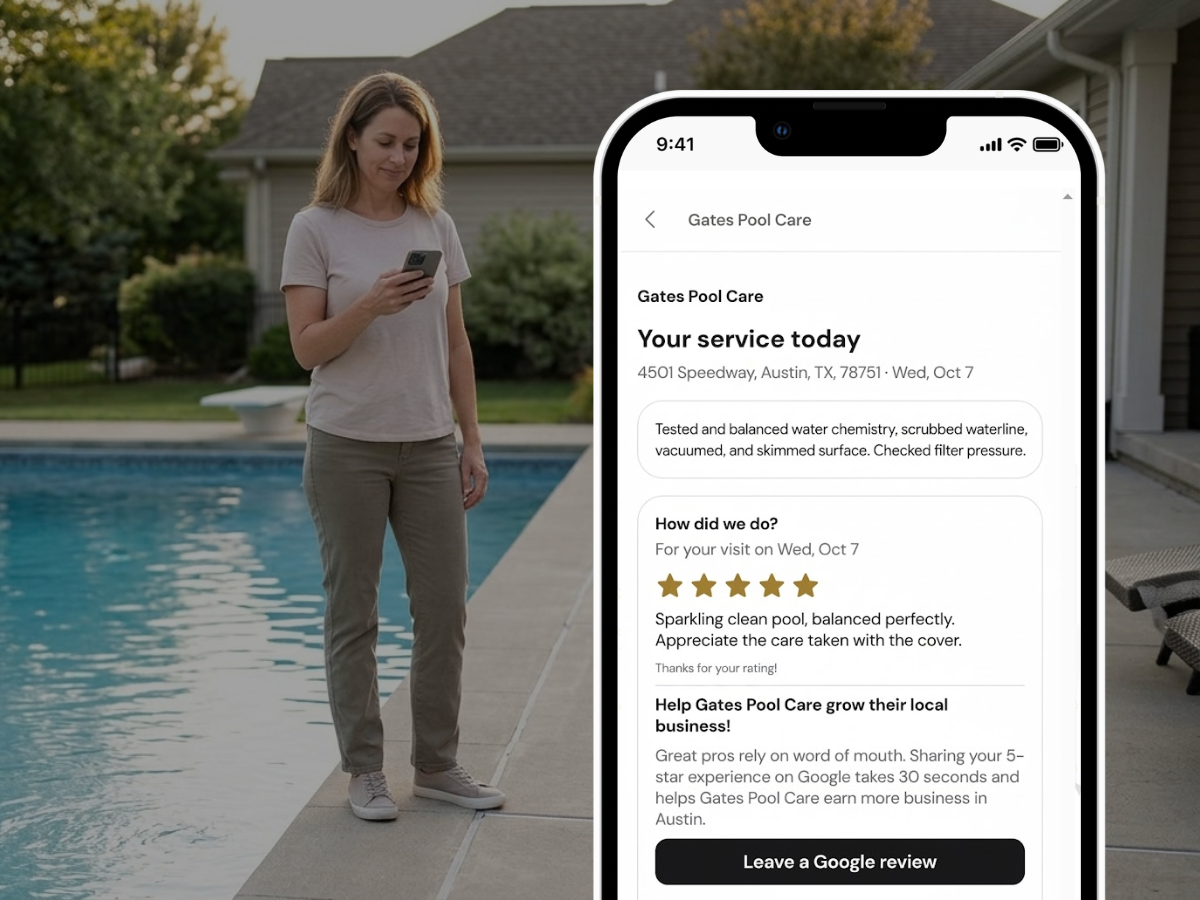
Every report has a "How did we do?" card with 1 to 5 stars and an optional comment. If Require a star rating before payment is on (the default), the invoice asks too, and the customer continues to payment right after rating.
A one-tap Google link.
Your customer sees a Leave a Google review button that opens Google's own review page for your profile. If they typed a comment, Copy my words copies it so they can paste it into Google.
Once is enough.
After a customer taps Leave a Google review, ProBase never shows them the Google ask again.
What your customer sees
Right after rating the visit, your customer sees a card:
“Help [Your Business Name] grow their local business!”
Under it are Leave a Google review and, if they left a comment, Copy my words. ProBase fills in your business name and, if it's on file, your customer's city. The rest of the wording is fixed.
On a pool route, the service report is the proof
Plenty of your customers never see you. They're at work when you pull up, and the only sign you were there is clear water and the report on their phone. Readings, a photo of the pool when you left, your notes.
The service report is also where the rating lives. A customer rates the visit while looking at the proof, so the review comes from someone who just saw the work.
Trust is what pool customers buy. You have their gate code. You work around their dogs, their kids, and pool chemicals. People searching "pool service near me" are often new homeowners, or people done with a pool guy who let the water go green, and they read reviews closely. They want to hear that you show up every week and the water stays clear. When a customer writes that in the comment box, Copy my words lets them paste it straight into their Google review.
Timing helps too. "Pool service near me" searches peak in May and June, when pools open (Google Trends). The reviews you collect on your weekly route are already on your profile when those homeowners start looking.
Your Google rating, inside ProBase
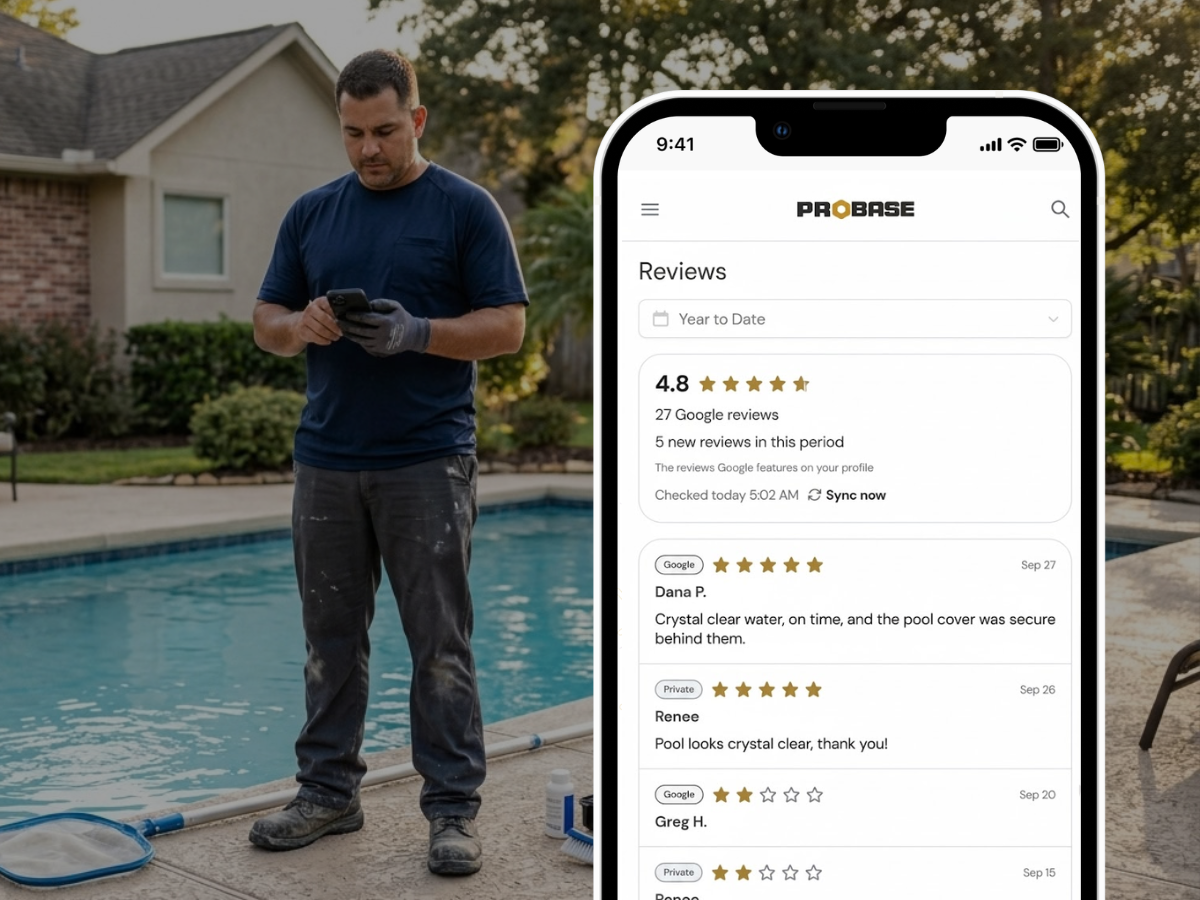
The Reviews page, under Business, shows your Google star average, total Google review count, new reviews in the period, and when ProBase last checked. Below that is one list: Google reviews marked "Google," alongside your ProBase visit ratings marked "Private."
ProBase checks Google daily, or tap Sync now. New Google reviews and every visit rating also land in your updates feed.
Two honest limits. The list shows the reviews Google features on your profile, so it won't be every review, though the count and average are complete. And you can't reply to Google reviews from ProBase. You reply in Google.
Straight answers
No new texts or emails to your customers. The ask lives in the report or invoice link you already send.
No Google login. ProBase never posts to Google for you.
No website needed. The button goes to your Google Business Profile.
Customers who pay cash or check see it too, as long as you send the service report.
Google only. Not Yelp or Facebook.
It's your call. The Google review request is on by default under Business > Payments > Reviews. Turn it off any time.
Works even better with...
Common questions
Answers to what pool pros ask most.
Your customers already vouch for you. Let Google hear it.
If you've got room on the route for more pools, the rating request is already on every report you send. Free, like everything else in ProBase.
Create My Free Account