ProBase Features
Your notes. Logged automatically.
Write what you did at each stop in plain English. ProBase reads your notes and fills in the service record — chemicals, readings, and observations — so you don't have to do it twice.
Create My Free AccountYou're already writing notes. You shouldn't have to log everything twice.
At every stop, you know the drill: shock the water, check the pH, brush the walls, spot the algae on the steps. You might jot it down or just keep a mental tally until you're back at the truck.
But then the second shift starts — opening an app to manually tap in chemicals, quantities, and readings. It's the same data, just in a more annoying format.
ProBase AI Assist handles the busywork. Write your notes naturally — the way you'd actually say them — and ProBase automatically extracts the chemicals, readings, and observations to build the service record for you. Write it once. Move to the next pool.
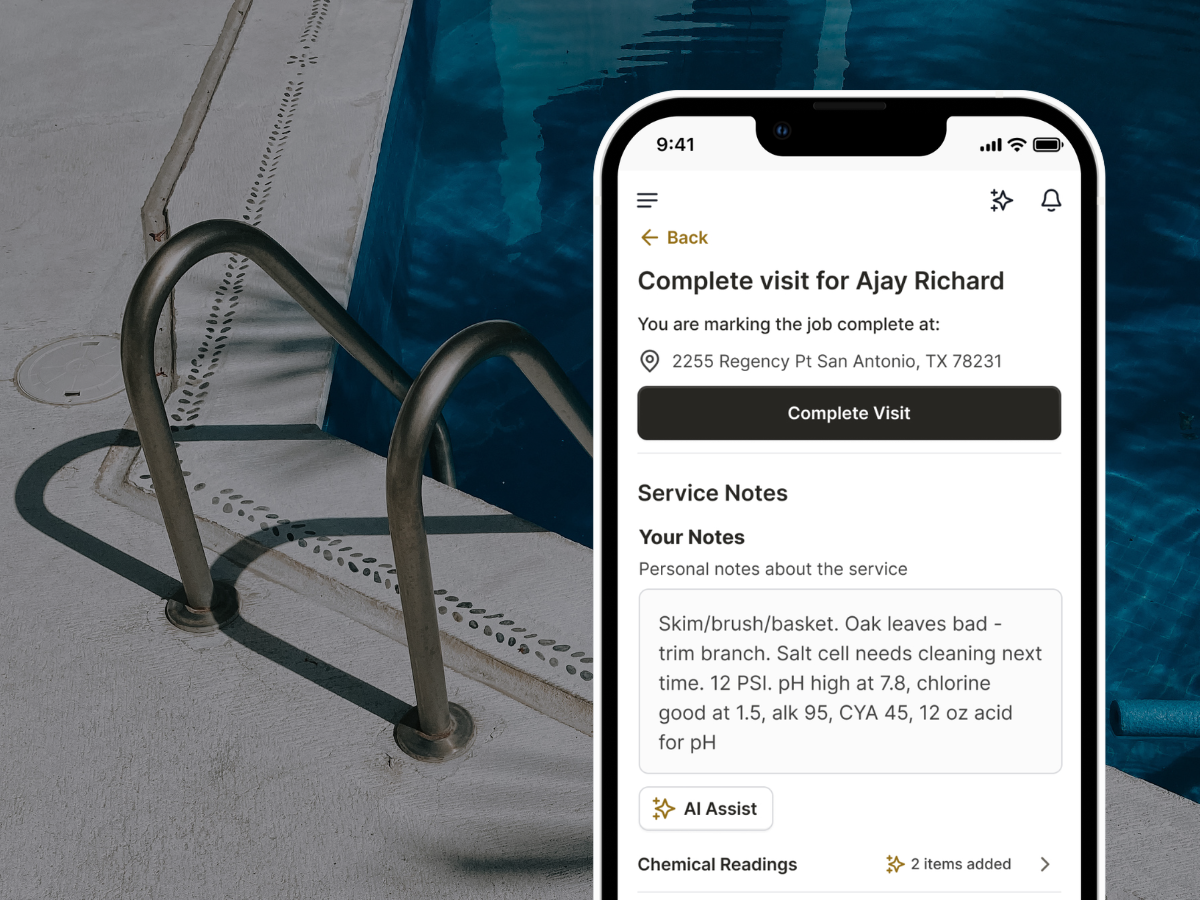
Write it how you'd say it
Finish the job, add your notes, and ProBase does the rest. No special format. No rigid fields. Just write what you did and let AI handle the structure.
Write naturally
No special syntax. Write "added 2 lbs shock and a quart of acid, pH was around 7.8" and ProBase knows what to do with it.
Chemicals extracted automatically
Shock, chlorine, acid, algaecide — whatever you added gets pulled out as a structured chemical entry with type and quantity logged to the visit.
Readings captured
pH, free chlorine, alkalinity, calcium hardness — readings mentioned in your notes come through as separate measurement entries tied to that visit.
Observations saved
Algae on the steps, a cracked fitting, an equipment issue — observations you mention in your notes get flagged in the service record so nothing gets lost.
Review before saving
Before anything goes to the record, you see exactly what ProBase pulled out. Edit, add, or remove anything — you're always in control of what gets saved.
Tied to the visit
Every entry is attached to that job, that customer, that date. The full record — what you added, what you measured, what you noticed — stays organized without extra work.
One entry instead of two
Most pros write notes and fill out their logs separately. With AI Assist, the notes are the log.
| Notes only | Manual log entry | ProBase AI Assist | |
|---|---|---|---|
| How you enter it | Write what you did | Tap through each field | Write what you did |
| Structured record created | ✗ | ✓ | ✓ Automatically |
| Chemicals logged with quantity | In the notes, unstructured | ✓ If you enter it | ✓ Pulled from your notes |
| Water readings captured | In the notes, unstructured | ✓ If you enter it | ✓ Pulled from your notes |
| Time to complete | Fast | Slower — field by field | Fast — just write |
| Tied to customer history | ✗ | ✓ | ✓ |
No other major pool service app — not Skimmer, not Pool Brain — parses plain-English notes into structured records. Manual field entry is the only option elsewhere.
Works even better with...
AI Assist feeds directly into the rest of your service record. Nothing gets lost.
Common questions
Answers to what pool pros ask most.
Stop logging everything twice.
Write your notes at each stop. ProBase handles the rest — free for pool pros.
Start Free Today