Built for residential & storefront window cleaners
Clean glass. Clean books. No software bill.
Quote from the homeowner's photos, put storefronts on a 28-day repeat, send before-and-after reports and get paid from a link, all in one free account.
No credit card · No trial period · Just free
Yes, it's actually free.
Window cleaning business software is one more monthly bill, and it keeps charging in January when the squeegee is in the garage. ProBase doesn't. It's $0 in April and $0 in January, with no trial to run out and no card to enter.
Free covers the whole business: the request page, quotes, the storefront route, service reports, invoices and payments. There's no cap on jobs, quotes, invoices or customers, no fee per user, and no paid plan waiting above it. A full spring costs what an empty January does. Nothing.
Card payments carry Stripe's standard 2.9% + 30¢, paid straight to your own Stripe account. ProBase adds nothing on top.
How does that work? ProBase gets paid by optional marketplace partnerships, as a share of jobs pros choose to take through them. Nobody has to take one. The free model, explained.
Spring is booked. The notebook is full.
The fall list on the back of a receipt.
Four homeowners said "come back in October" while you were packing the ladder. Two of them are on a receipt in the truck console. The other two are somewhere in your texts.
"Is this the window guy?"
A homeowner asked for a quote. You texted a number from your personal phone. She's still not sure it was you, or what the number covered.
Which shops on Main Street did you hit this month?
The bakery, yes. The insurance office, probably. The salon changed its hours, so maybe you skipped it. The storefront route lives in your memory, and memory doesn't keep dates.
The bookkeeper wants an invoice.
The deli owner is happy to pay. Her bookkeeper wants an invoice with a business name on it, not a Venmo request.
Hard work isn't the problem. The setup is.
How it works.
Pick Window Cleaning and add your logo.
Interior & Exterior Window Cleaning, Exterior Window Cleaning and Storefront Window Cleaning load into your account. Add your logo and you're set up in about 5 minutes.
Bring your customers over.
Import your customer list yourself from a CSV, a PDF, a text file, or photos of your paper notes, or ProBase will help you import it. AI sets up your customers, their services and prices, and their recurring visits on the schedule. You review each step before anything saves.
Clean it. Show it. Get paid.
Homes go on the days you book them, storefronts come back every 28 days, and every visit ends with photos and an invoice under your name.
Two kinds of customer. Each one sees a business.
To the homeowner
The request. Your contact form is a page with your logo and business name, at a link ending you choose, with a QR code for the van and the yard sign. Every request becomes a lead and an assessment automatically.
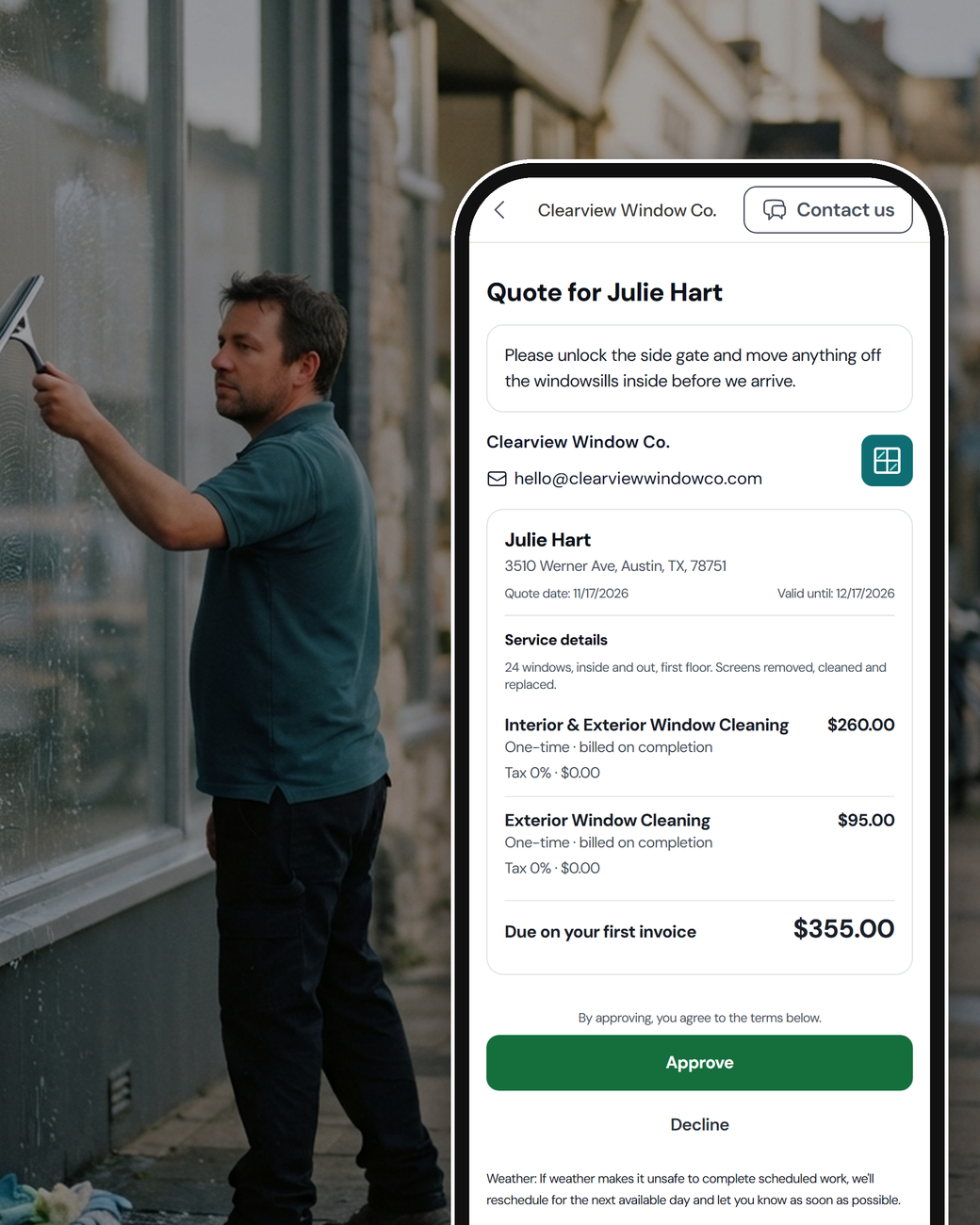
The quote. Send a link and the homeowner sends photos of each side of the house, so you count windows from the truck. The quote arrives under your logo with every service on it, a discount if you offer one, your terms and a Valid until date. Write "24 windows, inside and out" in the description and enter your total. The homeowner taps Approve or Decline, with no login.
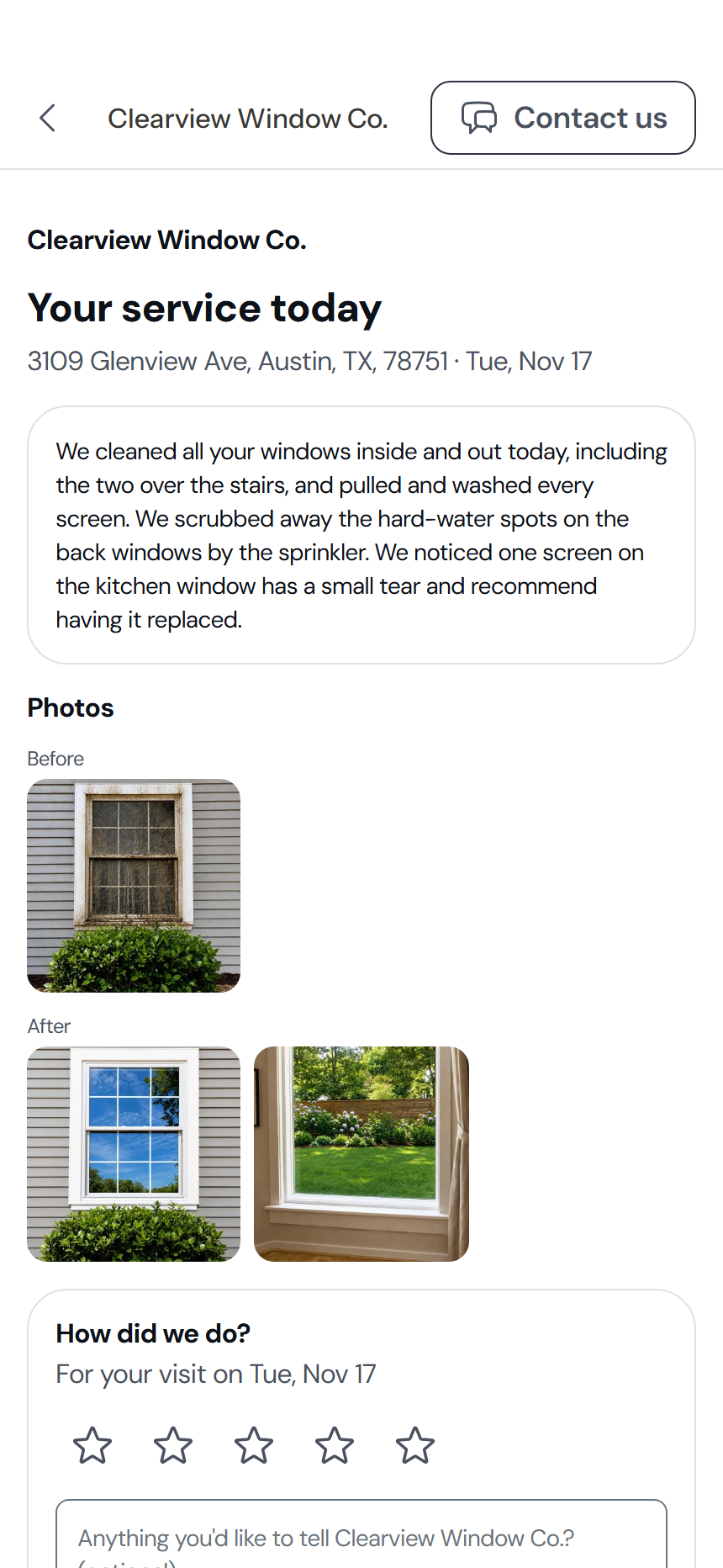
The report. After the job, the homeowner opens the service report from a text or email: your logo and name, a summary of the work, the after photos, a star rating with room for a comment, and a one-tap Leave a Google review link to your Google Business Profile.
To the shop owner
You show up. Storefront Window Cleaning repeats every 28 days, so the bakery sees you on the same weekday every month. Pin the visit at 7:30, before the shop opens.
The text. Tap Text on my way. ProBase texts it for you. When ProBase sends it, the text starts with your business name and carries your phone and email.
The invoice. Your logo and business name at the top, your terms (Net 15 or Net 30 for the shops that pay by check), and a link to pay by card or with the Pay on Venmo, Cash App and PayPal buttons. The printed or PDF copy goes out on your letterhead for the bookkeeper.
Two kinds of work, one book.
Homes and storefronts each run their own way, in the same account.
| Homes | Storefronts | |
|---|---|---|
| How often | Once, or twice a year with Every 6 months | Storefront Window Cleaning, every 28 days |
| When | The day you and the homeowner agree on | Pinned before the shop opens, or on set weekdays |
| On file | Side gate code, the dog, which windows | The back entrance, the owner's other locations |
| What they get | A quote and a service report under your logo | A report every visit and an invoice under your logo |
| How it bills | Per visit, paid from a link | Per visit, or on a service plan |
Window cleaning scheduling that keeps both straight.
Storefronts that come back on their own.
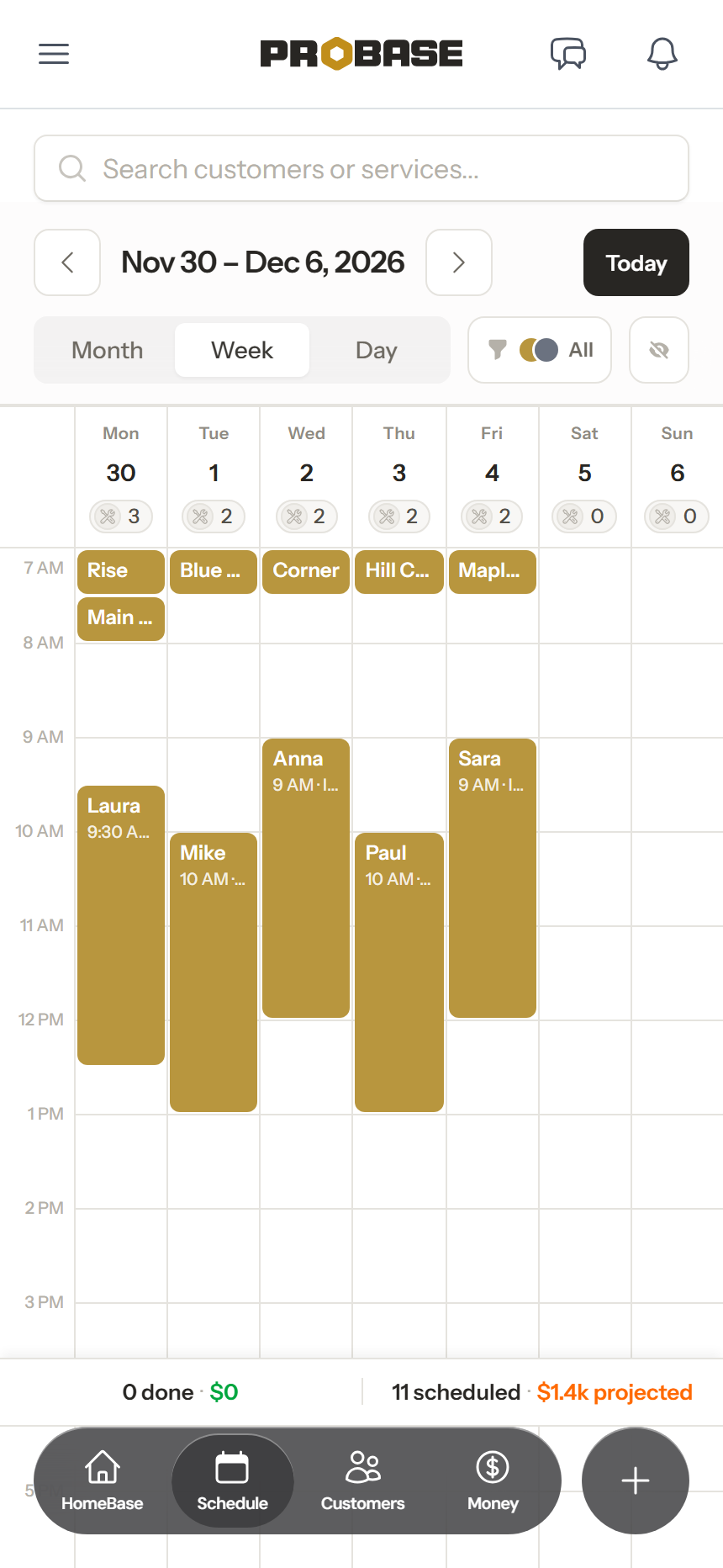
Storefront Window Cleaning repeats every 28 days, so a shop on a Tuesday stays on a Tuesday. Run a strip of shops on set weekdays instead if that suits the route better.
Homes that ask for spring and fall.
Book the spring clean as a one-time job, or set a homeowner to Every 6 months and the fall visit is already on the calendar. You can also choose Quarterly, Every 2 months, or any custom gap from 1 to 365 days.
Rain days.
Drag the day's visits to Thursday. If you cancel one instead, Move to next visit carries its charges and notes forward to the next visit.
The season at a glance.
Switch between day, week and month views. The revenue strip shows what's done, what's projected and what's scheduled, which is handy in March when you're deciding how many homes you can take.
The route and the crew.
Order the storefront run.
ProBase orders a crew's stops by drive time and shows a preview before you accept it, with Undo to keep your own order. When a job moves, it re-optimizes and tells you the time saved, like "22 min saved."
Split the day.
Assign & optimize routes hands open jobs to the best-placed crew, and Rebalance this day moves stops when one crew has the whole east side. A Recommended badge marks the crew with the shortest drive. Each crew gets working hours and a start and end location.
Bring on a helper safely.
Crew Member (Limited) sees the stops, the notes and the photos, without customer contact info or money. Crew Member (Standard), Crew Chief, Manager, Admin and custom roles cover everyone else.
Every property, on file.
The Locked gate note ("Gate code, key location, or how to get in") holds the side gate code. The Dog on property note warns whoever's on the ladder. A shop owner with three locations is one customer with three properties. The AI visit briefing, What you need for this visit, pulls it together for the crew only.
Before and after, on every job.
Every Window Cleaning service carries Before photos and After photos. Send the report with Include before photos on, and the customer sees the before and after side by side.
Build a checklist of your own, too. The builder has 8 question types, photo and signature among them, and runs a checklist on every visit or only the first. Window cleaners use it for things like "Screens removed and replaced" or "Ladder work: yes or no."
On the job, the visit timer records Start, Pause, Resume and Complete in the visit history. Photos taken where there's no signal stay on the phone until you're back online to send them. After the job, AI Assist turns your notes into the summary the customer reads.
Know who's paid.
Homes and storefronts bill differently.
Bill homes per visit. Bill a storefront per visit each time, or put the shop on a service plan. Service plan charges are added overnight, and ProBase tells you when invoices are ready to send. Then send them all at once.
Paid from the invoice.
- Card or bank account, through Stripe, with a tip of 15%, 20%, 25% or a custom amount
- Pay on Venmo, Cash App and PayPal buttons, plus a QR code, going to your own accounts. You mark those paid with a tap.
- Cash, check, Zelle or bank transfer, recorded in a few taps
Follow-up.
Overdue invoices show up under Needs your attention on the Money screen. Automatic late fees add a percentage once an invoice is past due, and the invoice warns the customer first. Reminders and receipts go out with one tap, and an accounting CSV covers every charge, credit, tip and payment for tax time.
A page for each customer.
The customer portal shows your business name at the top, with no login. Customers see upcoming and past visits, invoices and reports, pay, tip, approve quotes and contact you.
Your window cleaning services, already set up.
Pick Window Cleaning and three services are in your account from day one, including a storefront service built for a recurring route. Each comes with a description, time on site, billing and frequency, and you set your own price. Add anything else you sell as services of your own.
Each service shows a published price range as a reference, with dated sources: cost guides, software vendors' pricing guides and window cleaners' own posts. They aren't ProBase prices, and your area may run higher or lower.
| Service | What it covers | Time on site | Billing | Repeats | Published range | Sources |
|---|---|---|---|---|---|---|
| Interior & Exterior Window Cleaning | Clean glass inside and out, wipe sills, and remove and replace screens | 180 min | Per visit | One-time | $8-$16 per window, inside and out | Jobber, May 2026; Housecall Pro, Oct 2026; Fixr, Aug 2025 |
| Exterior Window Cleaning | Clean outside glass and frames, with screens brushed in place | 90 min | Per visit | One-time | $4-$8 per window, one story | Housecall Pro, Oct 2026; Jobber, May 2026; Fixr, Aug 2025; operator posts, windowcleaner.com, Jul 2023 |
| Storefront Window Cleaning | Clean storefront glass and entry doors on a recurring route | 30 min | Per visit | Monthly (every 28 days) | $30-$50 per visit for a small storefront | Jobber, May 2026; operator posts, r/windowcleaning, Dec 2025 |
The per-window ranges are what the sources publish. Turn the count into one price for each service.
Everything your window cleaning business runs on.
Quotes and estimates
Photos from the homeowner, one quote under your logo at your total, approved from their phone.
Scheduling
Storefronts every 28 days, homes every 6 months, pinned times before the shops open.
Route optimization
A crew's stops in drive-time order, with a preview and Undo.
Customer management
Every property with its gate and dog notes, and a shop owner's locations under one customer.
Before and after photos
On every job, with the after photos on a report under your logo.
Invoicing and payments
Invoices with your logo and terms, paid by card, Venmo, Cash App or PayPal.
Google reviews
A one-tap link to your Google Business Profile on every service report.
What makes ProBase different.
A storefront service from day one.
Storefront Window Cleaning arrives set to every 28 days, ready for a route.
Your name on every page a customer opens.
The request page, quote, report and invoice all carry your logo and business name.
Free in the off-season.
No monthly bill in January, no per-user fee, and no ProBase cut of your payments.
A founder who knows home services.
Founder Steve Corcoran spent 10+ years building LawnStarter to 500,000+ customers.
Compare the cost.
| Starting price | First year, 1 user | Adding a helper | Free trial | |
|---|---|---|---|---|
| ProBase | $0/month | $0 | $0 | Not needed. It's free. |
| Notebook and texts | Free | $0 | $0 | None |
| ServiceM8 | Free: $0/month for 1 user and 30 jobs a month | $0 while you stay within the job limit | Starter: $29/month, unlimited users, 50 jobs a month | 14 days |
| ResponsiBid | Startup: free. Scaling: $179/month | $0 on Startup; $2,148 on Scaling | The page doesn't say which plan includes which users. A setup fee is mentioned, with no amount | None listed |
| Jobber | Core: $49/month for 1 user, or $29/month billed yearly | $588 billed monthly, $348 billed yearly | Connect with 5 users: $199/month, or $149/month billed yearly. Extra users $29/month each | 14 days |
| Housecall Pro | Basic: $79/month for 1 user, or $59/month billed yearly | $948 billed monthly, $708 billed yearly | Essentials, 5 users: $189/month, or $149/month billed yearly. Max adds users at $35/month each | 14 days |
| Workiz | Not published: every plan says "Request pricing" | Not published | Not published | 7 days |
Prices in US dollars, from each company's own pricing page on November 13, 2026. Promotional discounts not included.
Two of these have a free plan. ServiceM8's covers 1 user and 30 jobs a month, with bonus jobs when you take card payments. ResponsiBid, which names window cleaning among the industries it fits, lists a free Startup plan but doesn't say what it includes, and its paid plans start at $179/month. ProBase has no job count to watch and no plan above the free one.
These are good tools with features ProBase doesn't have. If you need those features, pay for them. If you need homes and storefronts scheduled, routed and paid under your own name, that's $0 here.
Full comparisons: Jobber vs ProBase · Spreadsheets vs ProBase
Is ProBase right for you?
Built for:
- Solo window cleaners and companies running 1-5 crews
- A mix of residential homes and recurring storefront routes
- Spring and fall homeowners you want back on the calendar
- Window cleaners moving off a notebook, a phone full of texts or memory
Not designed for:
- Per-pane, per-window or per-story pricing
- Online booking
- Automatic reminders
- GPS crew tracking
- QuickBooks or Xero sync
- Custom brand colors, a custom domain or white-labeling
- High-rise and commercial building contracts with 20+ crews
Also pressure wash or clean gutters? See pressure washing software and gutter cleaning software.
Answers to what window cleaners ask most.
Is ProBase really free for a window cleaning business?
Yes. $0 a month, all year, with no trial and no credit card, ever. There's no fee per user and no ProBase fee on payments. Card payments cost Stripe's standard 2.9% + 30¢. ProBase earns a share of jobs that pros choose to take through optional marketplace partnerships. You never have to take one, and your tools stay free either way.
Is there a window cleaning app?
Yes. ProBase installs on your phone's home screen and opens like an app, with no app store needed. At signup, type "window washing" or "window cleaning" to find the industry. The calendar, routes, photos and invoices all work from your phone.
Will homeowners and shop owners see my business name?
Yes, on everything they open. Your logo and business name appear on your request page, quotes, service reports and invoices, and printed or PDF invoices go out on your letterhead. Texts ProBase sends start with your business name.
How do I price per pane or per window?
Write the count in the description, like "24 windows, inside and out," and enter your total.
How do I charge more for second-story windows?
Build it into your total, or add a second service for the upper floor at its own price.
Will storefronts stay on the same day each month?
On the same weekday, yes. Storefront Window Cleaning repeats every 28 days, so it holds the weekday, not the date. You can also put a shop on set weekdays and pin the time before it opens.
How do I bring my spring customers back in the fall?
Set the house to Every 6 months and the fall visit is already on your calendar. When you want to check in, send a message with one tap.
What happens on a rain day?
Drag the visits to another day. If you cancel a visit instead, Move to next visit carries its charges and notes forward to the next one.
How do new customers request a window cleaning?
Through your contact form link or QR code. Every request becomes a lead and an assessment, and you set the day.
Is there a demo I can look at first?
Yes, inside your free account. Choose Explore a demo account on HomeBase to look around a sample home-services business with customers, jobs and routes already filled in. Your own account starts with your window cleaning services.
Homes on Tuesday. Shops on Thursday. Paid by Friday.
Pick Window Cleaning and run every home and storefront, from quote to paid, in one free account.
Create My Free Account