Built for solo haulers & 1–5 truck crews
Quote it, haul it, get paid for it. Every job pays you, not your software.
Take requests from your truck's QR code, quote from customer photos, collect a deposit, run pickups in drive order, show the cleared-out garage and get paid, all in one free account.
No credit card · No trial period · Just free
Yes, it's actually free.
Your money already goes to dump fees, fuel and the truck payment. ProBase doesn't join the list. No subscription, no card on file, no fee per user, and no fee per completed job.
Card payments run at Stripe's standard 2.9% + 30¢ and land in your own Stripe account. ProBase adds nothing on top.
The business model is optional marketplace partnerships: ProBase earns a share of jobs pros decide to take through them. Skip them and every tool stays free. Why ProBase is free.
You can't price a pile you haven't seen.
"It's just a few boxes."
You drive 25 minutes to quote a few boxes. It's half a garage, a treadmill and a sleeper sofa. Now you quote on the driveway or come back tomorrow.
The Saturday no-show.
They said yes by text on Tuesday. Saturday at 8am you're in their driveway with two guys on the clock, and nobody's home. Nothing was paid up front.
Cash in the cupholder.
One customer paid cash. One sent Venmo. One said the check is in the mail. At 9pm you're scrolling three apps to work out who still owes you.
Hard work isn't the problem. The setup is.
How it works.
Pick Junk Removal at signup.
It's under Popular. Junk Removal, Furniture Removal and Appliance Removal load into your account, each with a description and time on site. You set the prices. Setup takes about 5 minutes.
Put your customers on file.
Import your list from a CSV, a PDF, a text file or a photo of your paper notes, or get free help importing it. You review it before anything saves.
Send your first photo request.
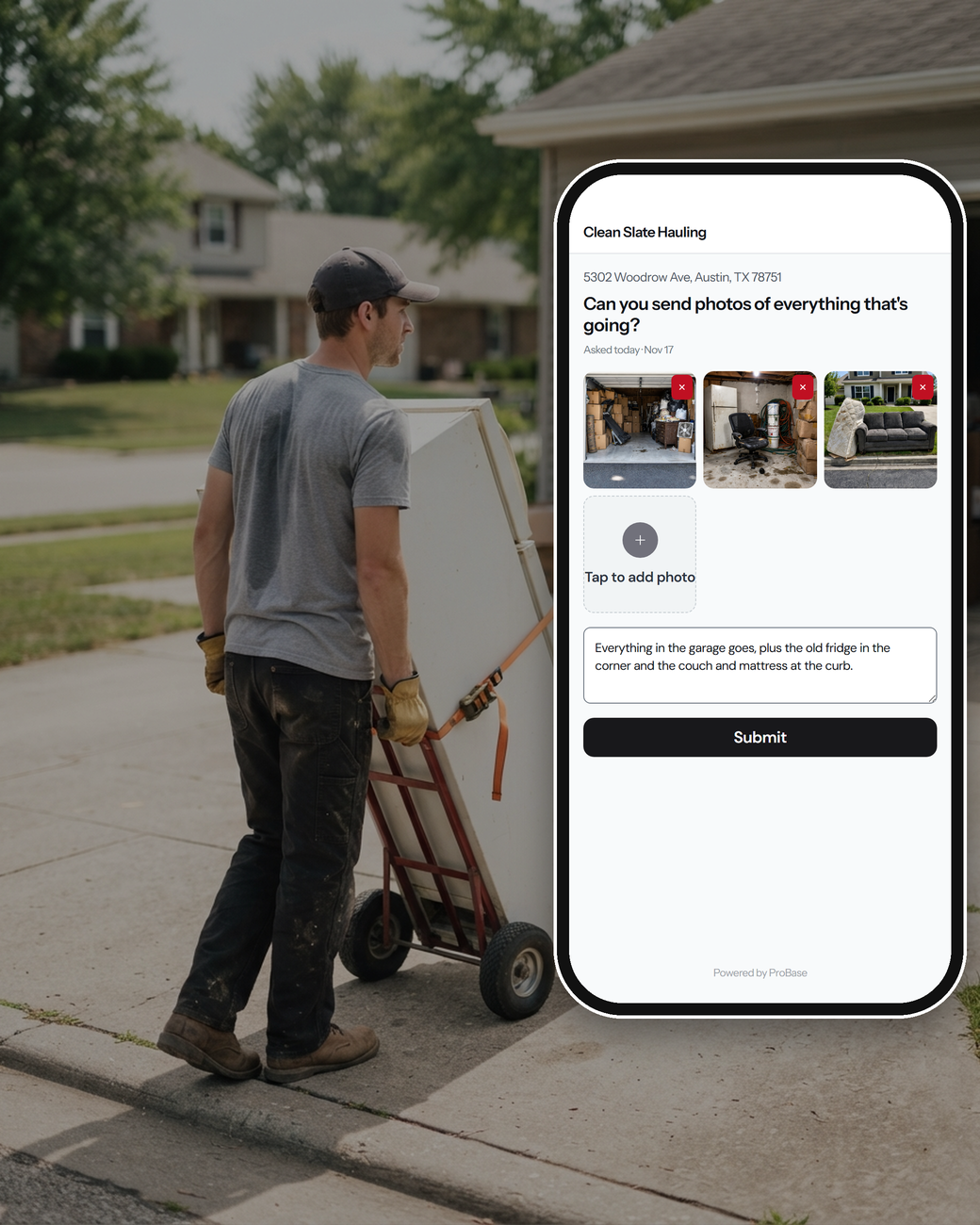
Text the photo link to your next lead and price the job before you start the truck.
Quote the pile before you drive out.
The request.
Your contact form lives at a link you name, with your logo and business name at the top. Put its QR code on the truck door. Every request lands in ProBase as a new lead and an assessment.
The photos.
On the assessment, tap Ask for photos. ProBase texts it for you. Your customer opens the link, shoots the garage, the basement and the couch by the curb, and sends them with a note. No account, no login, no app. Missed the attic? They add more through the same link.
The quote.
Create quote opens a draft with their photos and note attached. Put Junk Removal and Appliance Removal on one quote, then add a discount, your terms and a Valid until date.
The yes.
Your customer taps Approve from their phone. Set a deposit with Require a deposit, as a percentage or a dollar amount. It goes out as its own invoice on approval and comes off the job's first invoice. A decline comes with a reason, so you know whether it was price or timing.
Haul it, show it, get paid for it.
Before and after, every visit.
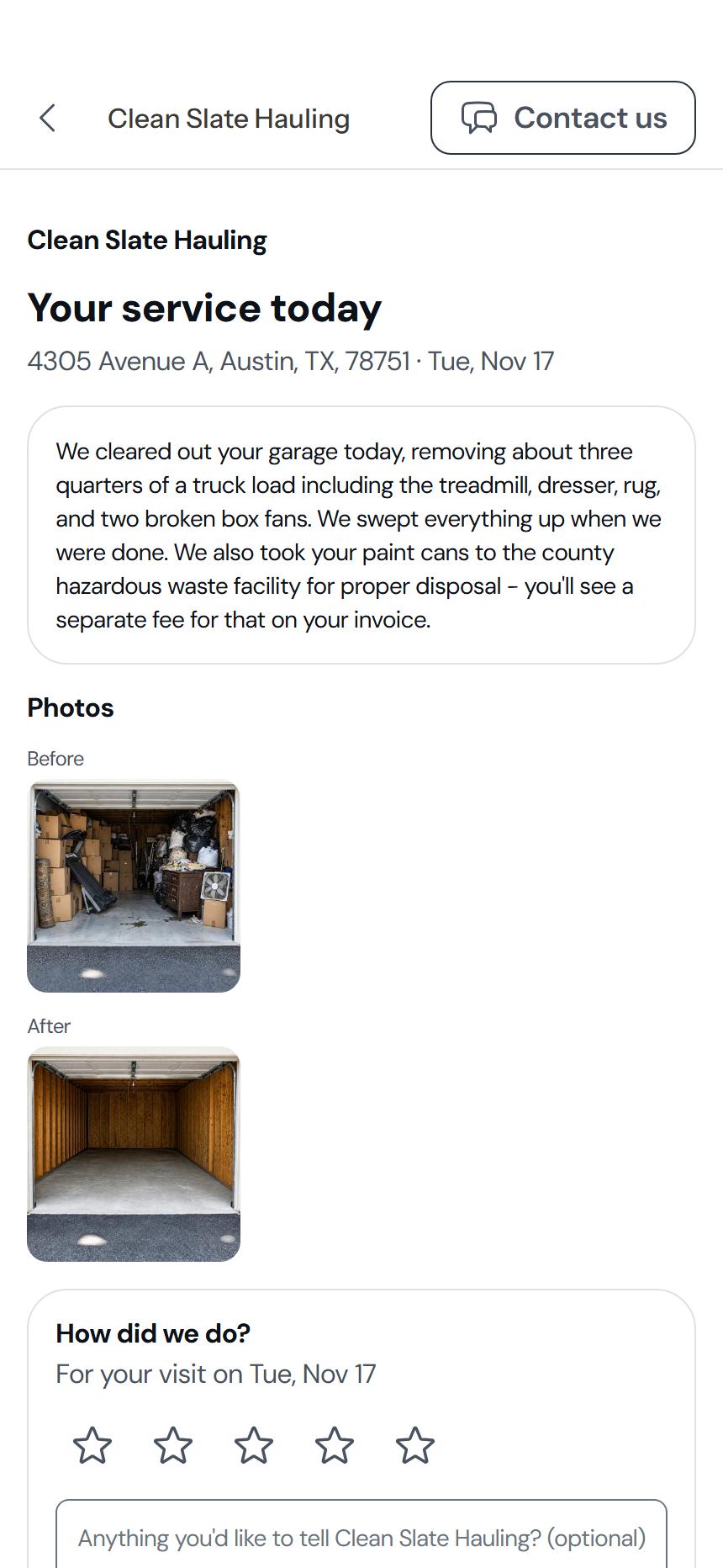
Every service carries Before photos and After photos. Your customer gets a service report by link with the empty garage in the after photos, plus the before shots if you turn on Include before photos.
Ratings and reviews.
Customers rate the visit on the service report, with a one-tap Leave a Google review link to your Google Business Profile.
The dump fee goes on the bill.
Add the landfill fee or a mattress fee as a charge on the invoice, in the amount you set. Two fridges and a freezer? Write it in the description and enter your total.
More ways to pay than "I'll mail a check."
- Card or bank account, through Stripe, with room for a tip
- Pay on Venmo, Cash App and PayPal buttons, paid to your own accounts
- Cash, check or Zelle, which you record with a tap
One screen shows who's paid and who's overdue.
On my way.
Tap Text on my way from the stop, and the customer knows you're coming.
Your junk removal services, already set up.
Pick Junk Removal and three services are in your account from the start. Each comes with a description, time on site, billing and frequency, and you set your own price. Add estate cleanouts, hot tub removal or anything else you haul as services of your own.
Each service shows a published price range as a reference, with dated sources from cost guides. They aren't ProBase prices, and your market may run higher or lower.
| Service | What it covers | Time on site | Billing | Repeats | Published range | Sources |
|---|---|---|---|---|---|---|
| Junk Removal | Haul away a load of unwanted items, priced by how much of the truck it fills | 60 min | Per visit | One-time | $75-$200 for a minimum or quarter load | Angi, Sep 2026; Housecall Pro, May 2026; Fixr, Jan 2025; Jobber, Jul 2024 |
| Furniture Removal | Pick up and dispose of a couch, dresser, or other bulky furniture | 30 min | Per visit | One-time | $75-$250 per piece | Angi, Sep 2026; Fixr, Jan 2025; Jobber, Jul 2024; 1-800-GOT-JUNK, Oct 2026 |
| Appliance Removal | Haul away a refrigerator, washer, dryer, or other major appliance | 30 min | Per visit | One-time | $60-$200 per appliance | Angi, Sep 2026; Housecall Pro, May 2026; Fixr, Jan 2025; Jobber, Jul 2024 |
The Junk Removal range is published by load, and the others per piece or appliance. Set one price for each service, and write the load size or item count in the description so the customer sees what's included.
Organized on your side.
Every customer on file.
Each customer keeps their properties, notes and visit history. A property manager with six rentals is one customer with six properties.
One calendar.
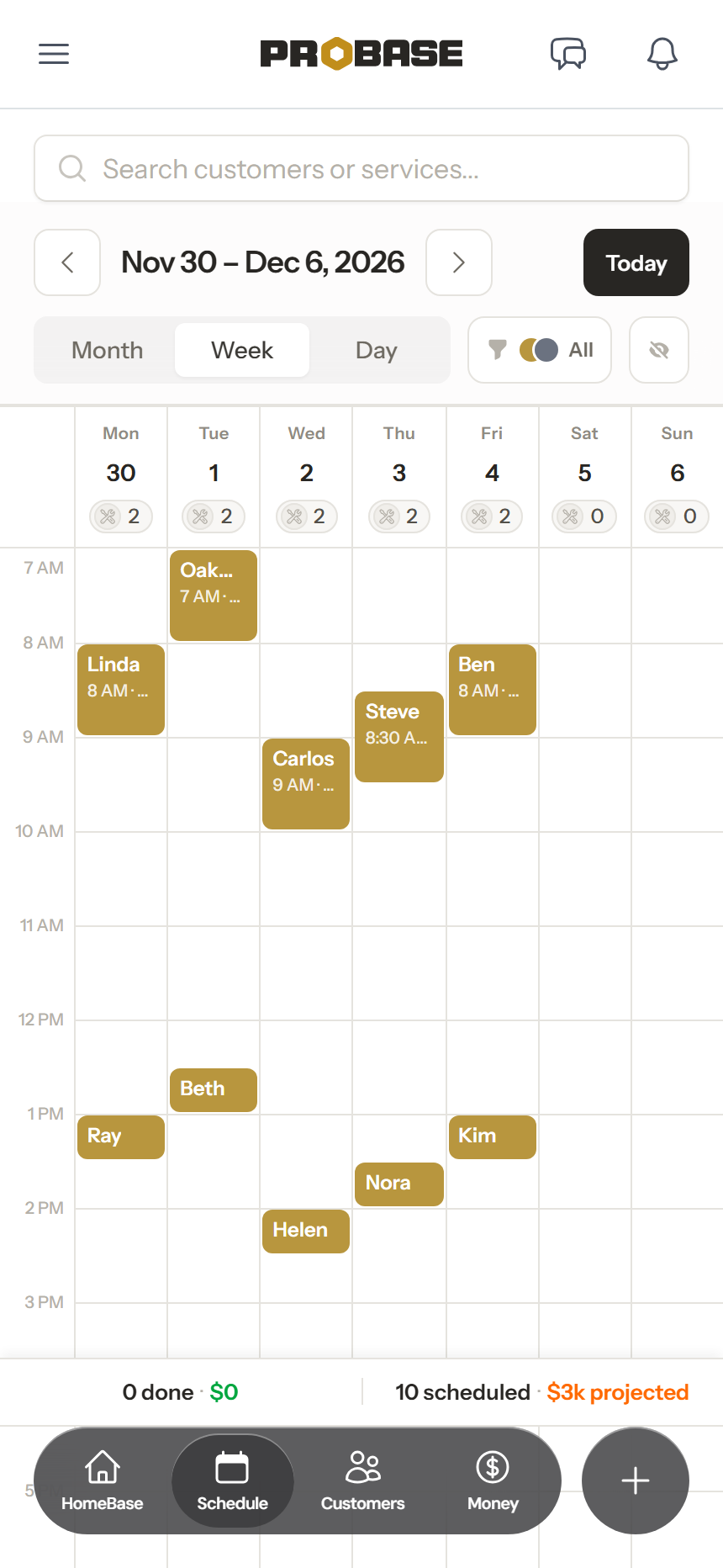
Day, week and month views. Drag Thursday's pickup to Saturday when the customer's move-out date slips, or pin the 7:00 estate cleanout so routing never moves it.
Trucks and routes.
ProBase orders each crew's stops by drive time. Assign & optimize routes fills a crew's day, and Rebalance this day evens a lopsided one. Give a helper the Crew Member (Limited) role and they see and complete their crew's work, while customer contact info and money stay with you.
Books for your bookkeeper.
Export an accounting CSV of every charge, credit, tip and payment.
What makes ProBase different.
$0 a job, every job.
No per-job fee, no per-user fee, no cut of your card payments. Your 40th haul of the month costs you the same as your first: nothing.
Your business stays yours.
Your Stripe account, your customer list, and a CSV export whenever you want it. ProBase never sells customer data.
A founder who knows home services.
Founder Steve Corcoran spent 10+ years building LawnStarter to 500,000+ customers.
Compare the cost.
| Starting price | First year | What changes the price | Free trial | |
|---|---|---|---|---|
| ProBase | $0/month | $0 | Nothing. No per-job or per-user fee | Not needed. It's free. |
| HaulHQ | $0/month base | $0 to $1,788 for one service type | Jobs. $1.50 per completed job, plus 1.5% of card payments on top of Stripe's rate. All HaulHQ fees together cap at $149/month per service type (junk removal, dumpster rental). Texts past 100 a month and review requests past 50 cost extra. Users and drivers are unlimited | None listed |
| Jobber | Core: $49/month for 1 user, or $29/month billed yearly | $588 billed monthly, $348 billed yearly | Users. Connect with 5 users: $199/month, or $149/month billed yearly. Extra users $29/month each | 14 days |
| Housecall Pro | Basic: $79/month for 1 user, or $59/month billed yearly | $948 billed monthly, $708 billed yearly | Users. Essentials with 5 users: $189/month, or $149/month billed yearly. Max adds users at $35/month each | 14 days |
Prices in US dollars, from each company's own pricing page on November 13, 2026. Promotional discounts not included.
HaulHQ is the closest thing to free in junk removal, and it's built only for haulers: load-tier pricing, online booking, crew dispatch and dumpster tracking, per its own site. If you rent dumpsters or want customers to book themselves, give it a look.
The difference is the meter. On a $200 job paid by card, HaulHQ's fees come to $4.50 before Stripe's. ProBase's come to $0, on the first job and the hundredth.
Full comparisons: Jobber vs ProBase · Spreadsheets vs ProBase
Is ProBase right for you?
Built for:
- Solo haulers and junk removal companies running 1-5 crews
- Cleanouts, furniture and appliance pickups, and one-time hauls
- Haulers who quote from photos and want a deposit before the truck rolls
- Teams that want quotes, schedules and payments in one place
Not designed for:
- Pricing by load, cubic yard or item
- Online booking
- GPS tracking of trucks or crews
- Dumpster or container rental tracking
- Automatic reminders or marketing campaigns
- QuickBooks or Xero sync
Also take handyman or gutter jobs? See handyman software and gutter cleaning software.
Answers to what junk removal pros ask most.
Is ProBase really free for a junk removal business?
Yes. $0 a month, with no trial and no credit card, ever. There's no fee per user and no ProBase fee on payments. Card payments cost Stripe's standard 2.9% + 30¢. ProBase earns a share of jobs that pros choose to take through optional marketplace partnerships. You never have to take one, and your tools stay free either way.
How is that different from HaulHQ's $0 plan?
HaulHQ's $0 is the base subscription. Its pricing page lists $1.50 per completed job plus 1.5% of card payments on top of Stripe's rate, capped at $149 a month per service type (checked November 13, 2026). ProBase charges nothing per job and adds nothing to Stripe's rate.
How do customers send me photos of the job?
You text them a photo link from the assessment. They open it on their phone, add photos and a note, and submit. There's nothing to download, and they can add more later through the same link.
Is ProBase a junk removal app for my phone?
Yes. ProBase runs on your phone, tablet and computer, and installs on your phone's home screen like an app, with no app store needed. What you can do at a desk, you can do from the truck.
How do I price jobs by the load?
Write the load size in the description, like "about half a truck," and enter your total. The range by load in the table above is a published range to help you get there.
Can I take a deposit before the haul?
Yes. Add a deposit to the quote as a percentage or a dollar amount. When your customer approves, it goes out as its own invoice. Once paid, it comes off the job's first invoice.
Can I charge for dump fees or heavy items?
Yes. Add a dump fee, a mattress fee or any other cost as a charge on the invoice, in the amount you set.
How do new customers request a pickup?
Through your contact form link or the QR code on your truck. Every request becomes a lead and an assessment, ready for you to quote.
How do I plan my trucks' day?
ProBase puts each crew's stops in drive-time order, and Assign & optimize routes fills a crew's day.
Is there a demo I can try first?
Yes, inside your free account. Choose Explore a demo account on HomeBase to look around a sample home-services business with customers, jobs and routes already filled in. Your own account starts with your junk removal services.
Every job, start to finish, on one free account.
Pick Junk Removal, send your next customer the photo link, and keep every dollar the job brings in.
Create My Free Account