Built for solo detailers & small crews
Run a professional detailing business. Pay nothing.
Quote from customer photos, turn one-time full details into recurring maintenance washes, and collect payment on site with zero monthly bills.
No credit card · No trial period · Just free
Yes, it's actually free.
Detailing software usually means a monthly bill. Urable starts at $70 a month. The free tools you find are mostly booking calendars, or general apps that cap your jobs.
ProBase is free and made for detailing. $0, no card on file, no trial, no fee per user.
Card payments run at Stripe's standard 2.9% + 30¢ and land in your own Stripe account. ProBase adds nothing.
ProBase earns a share of jobs that pros choose to take through optional marketplace partnerships. Skip them and every tool stays free. Why ProBase is free.
The car looks perfect. The business side doesn't.
"Full detail, $250."
You quoted it by text off "a small SUV." It pulls up with two car seats, a beach weekend in the carpet and dog hair in every seam. Now you eat three extra hours or have an awkward talk in the driveway.
The monthly customer who got one visit.
"Come back every month," she said after the full detail. Nothing went on a calendar. Six weeks later she's at the tunnel wash.
"Was that chip there before?"
The customer spots it at pickup. Your before photos are somewhere in a camera roll of 4,000 other cars.
Who paid?
Two Venmos, one Zelle, $80 in the cupholder and an "I'll send it tonight." At 9pm you're matching them across three apps.
Hard work isn't the problem. The setup is.
How it works.
Pick Auto Detailing and add your logo.
Choose Auto Detailing from the industry list at signup. Full Detail, Interior Detail and Maintenance Wash - Monthly load into your account, with Full Detail as the default on new jobs. Upload your logo in Settings. Setup takes about 5 minutes.
Put every customer on file.
Import your list from a CSV, a PDF, a text file or photos of paper notes, or get free help importing it. AI sets up customers, services, prices and repeat visits. You review each step before anything saves.
Quote, detail, report, invoice.
Every car follows the same steps, with your name on each one.
Quote the car you'll actually see.
Photos before the price.
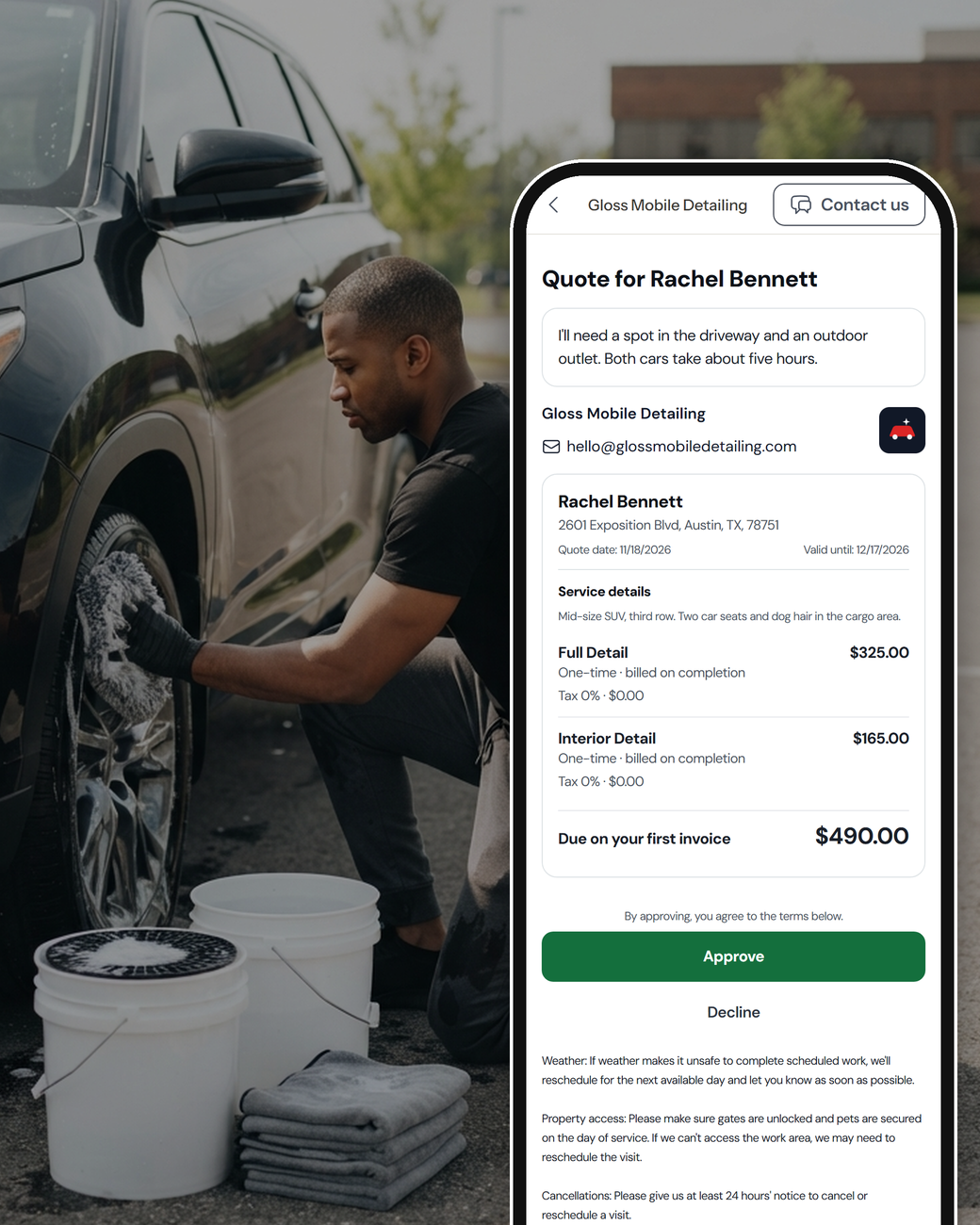
Tap Ask for photos and text the customer a link. They shoot the seats, the carpet and the paint from their phone, with no login and no app. Their photos land on the request, so you price the real car before you drive over.
Every service on one quote.
Put Full Detail, Interior Detail and your own add-ons, like pet hair or headlight restoration, on one quote under your logo. Add a discount, your terms and a Valid until date. ProBase prices each service as one amount and doesn't price by vehicle size, so write "mid-size SUV, third row" in the description and enter your price.
A deposit on the big jobs.
Ceramic coating and paint correction tie up a whole day. Ask for a deposit on approval. It goes out as its own invoice and comes off the first invoice for the job.
Yes or no from their phone.
The customer taps Approve or Decline. Set a start date and approval books the first visit.
Before and after on every car.
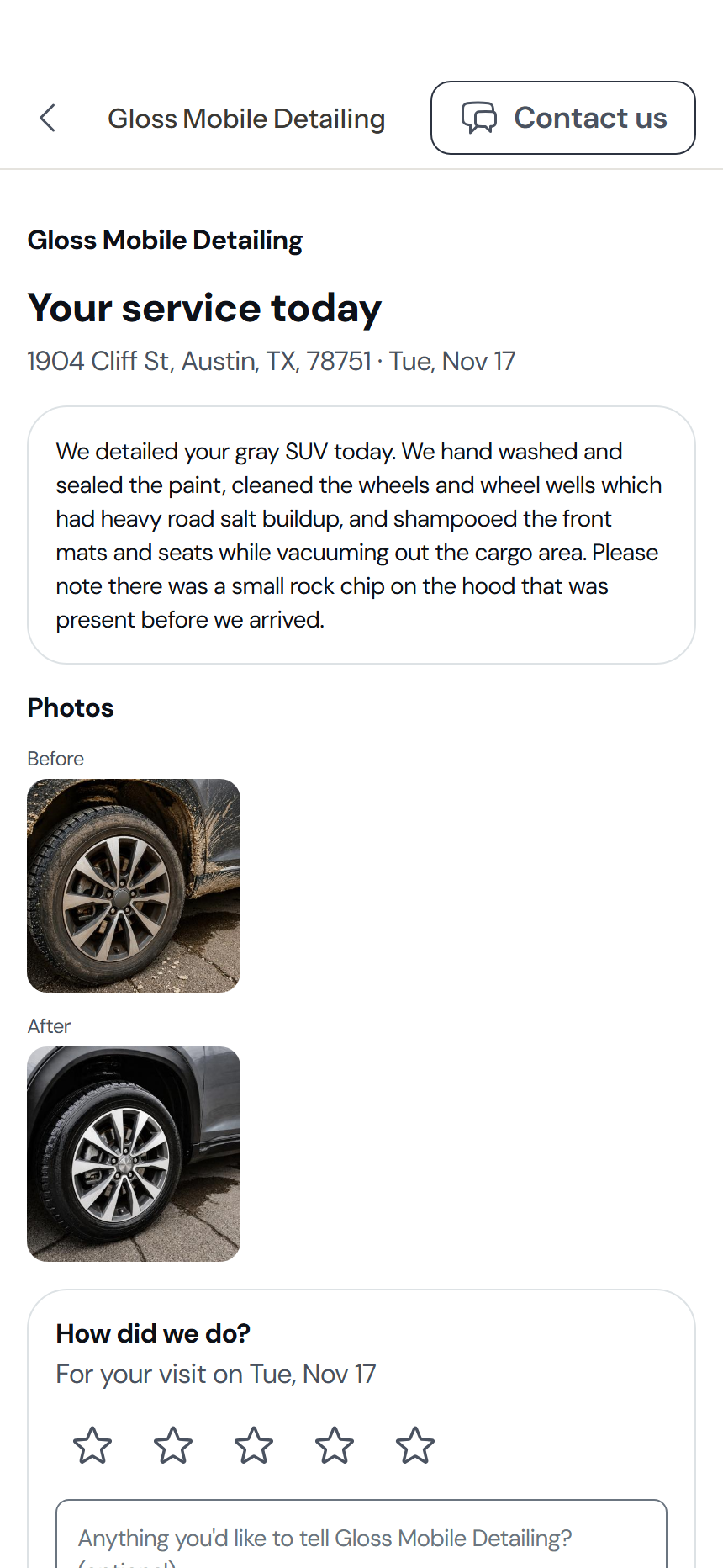
Every Auto Detailing service carries Before photos and After photos. The customer opens the service report from a text or email, with no login. It shows:
- Your logo and business name
- A summary of the job, written by AI Assist from your notes
- Before and after photos side by side
- Any balance due
- A star rating with room for a comment
- A one-tap Leave a Google review link to your Google Business Profile
The customer who handed you the keys in the office lot at 8am sees the salt-caked wheel wells next to the clean ones at noon. And when someone asks about a chip, the before photos are saved on the visit.
Want more on the record? The checklist builder has 8 question types, photo and signature among them, for things like products used.
The maintenance wash, billed every month.
A full detail is one job. A maintenance plan is a customer.
Maintenance Wash - Monthly repeats every 28 days. Bill it as a monthly subscription. On the billing day, the charge lands on the customer's draft invoice. Nothing goes out until you review it in Send batch invoices and send them all at once. Visits the plan covers show an Included tag.
Your customer pays from the link on the invoice:
- Card, through Stripe, with a tip of 15%, 20%, 25% or a custom amount
- Bank account
- Pay on Venmo, Cash App and PayPal buttons, going to your own accounts. You mark those paid with a tap.
- Cash, check or Zelle, which you record
ProBase never charges a saved card on its own. Your invoices carry your logo and terms, and automatic late fees add a percentage once one is past due.
Built for a day spent driving.
Stops in drive-time order.
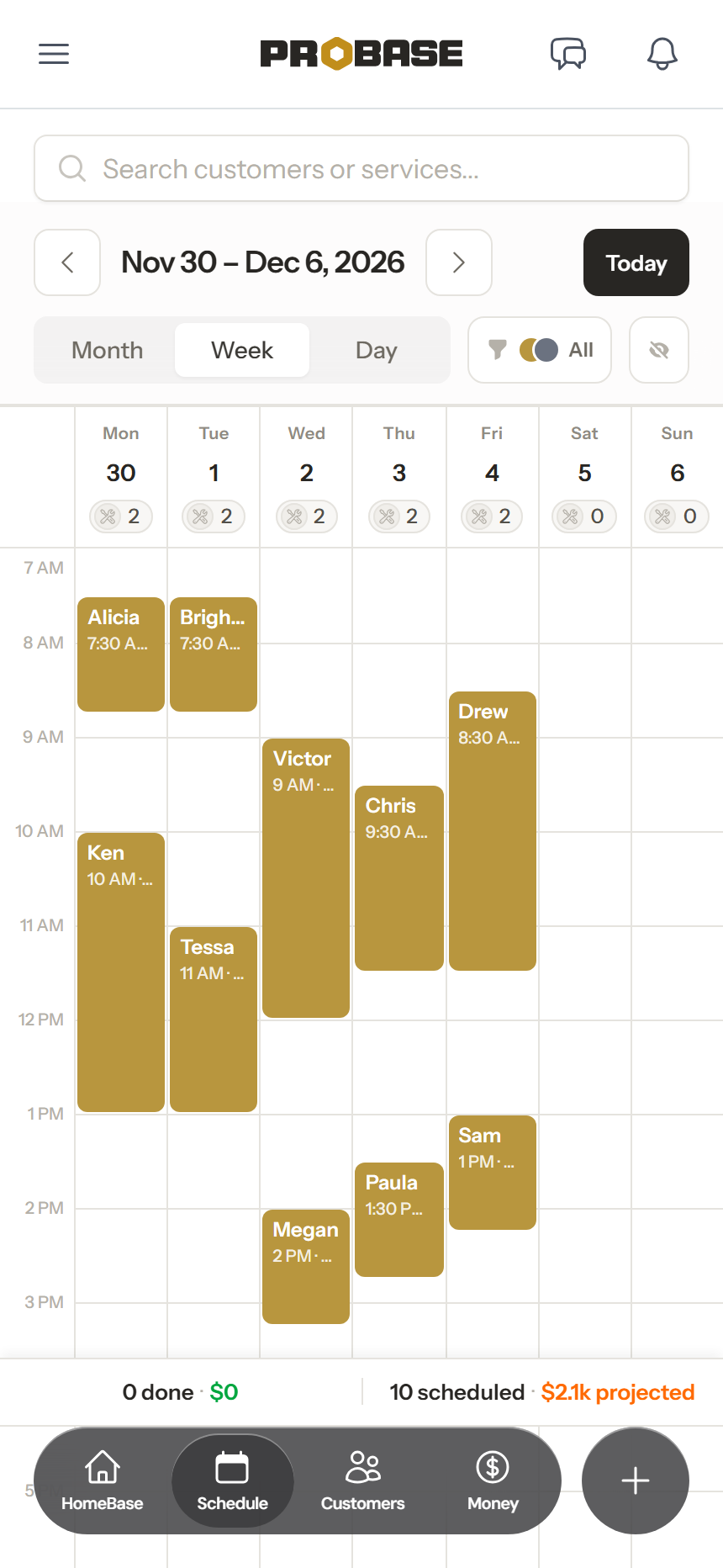
ProBase orders each day's cars by drive time, with a preview and Undo. Pin the 7:30 office-lot appointment and routing leaves it alone. Drag a rainy Thursday to Saturday.
Every customer on file.
Each customer keeps their addresses and visit history. A business with five work vans is one customer with one open invoice. That's the CRM part of auto detailing software, without the setup.
Notes that ride along.
A Locked gate note ("Gate code, key location, or how to get in") tells you where the keys are. A Dog on property note warns you before you open the side gate to reach the driveway.
On my way.
Tap Text on my way. ProBase texts it for you. Texts are one-way, so customers reply to you.
Your detailing services, already set up.
Pick Auto Detailing and three services are in your account from the start, each with a description, time on site, billing and repeat. You set your own price. Add ceramic coating, paint correction or anything else you do as services of your own.
Each service shows a published price range for a sedan as a reference, from dated cost and pricing guides. They aren't ProBase prices, and your market may run higher or lower.
| Service | What it covers | Time on site | Billing | Repeats | Published range | Sources |
|---|---|---|---|---|---|---|
| Full Detail | Hand wash, decontaminate, and protect the paint; clean wheels, tires, and glass; vacuum, wipe down, and dress the whole interior | 180 min | Per visit | One-time | $175-$350 for a sedan | TopDetailers, Sep 2026; Jobber, Apr 2026; InvoiceFly, Sep 2026 |
| Interior Detail | Vacuum seats, carpets, mats, and trunk; clean and dress the dash, console, and door panels; clean inside glass | 120 min | Per visit | One-time | $150-$250 for a sedan | TopDetailers, Sep 2026; Housecall Pro, Oct 2026; Jobber, Apr 2026 |
| Maintenance Wash - Monthly | Hand wash, wheels and tires, quick interior vacuum and wipe-down, and glass once a month, for a car that has had a full detail | 75 min | Subscription, monthly | Every 28 days | $85-$120 per visit for a sedan | Operator price lists (Miami FL, Bay Area CA, Charlotte NC), Oct 2026 |
ProBase doesn't price by vehicle size. SUV ranges are on the quotes and estimates page.
Everything your detailing business runs on.
Quotes and estimates
Photos of the car first, every service on one quote, a deposit on approval.
Contact form
A page with your logo and name at a link you choose, with a QR code for the van.
Service reports
Before and after photos and your Google review link, opened from a text or email.
Invoicing and payments
Monthly plans, batch sending, card, bank, Venmo, Cash App or PayPal.
Customer records
Addresses, key notes and visit history.
Scheduling and routes
Drive-time order, pinned times and 28-day repeats.
What makes ProBase different.
Free and made for detailing.
Detailing services and published ranges load at signup. Nothing to pay, from the first car.
Your name on everything the customer touches.
The contact form, quote, report and invoice carry your logo and business name.
Repeat customers built in.
The monthly maintenance wash is a ready-made service, billed as a subscription.
A founder who knows home services.
Founder Steve Corcoran spent 10+ years building LawnStarter to 500,000+ customers.
Compare the cost.
| Starting price | First year | What changes the price | Free trial | |
|---|---|---|---|---|
| ProBase | $0/month | $0 | Nothing | Not needed. It's free. |
| Texts, notes app and Venmo | Free | $0 | Your evenings | None |
| Urable | Express: $70/month. Pro: $110/month. Enterprise: $183/month | $840 on Express | Plan tier. Every plan lists unlimited users | Offered; length not listed |
| Jobber | Core: $49/month for 1 user, or $29/month billed yearly | $588 billed monthly, $348 billed yearly | Users and plan. Connect with 5 users: $199/month, or $149/month billed yearly. Extra users $29/month each | 14 days |
Prices in US dollars, from each company's own pricing page on November 13, 2026. Promotional discounts not included.
Urable is built for detailing too, with online booking and pre-work damage photos ProBase doesn't have. If you need those, it may be worth $70 a month. If you want quotes, reports and monthly billing for $0, start here.
Full comparisons: Jobber vs ProBase · Spreadsheets vs ProBase
Is ProBase right for you?
Built for:
- Mobile detailers and shops running 1-5 crews
- Full details, interiors, maintenance washes and the add-ons you sell with them
- Detailers who want repeat monthly customers
- Pros who want quotes, reports and invoices with their own name on them
Not designed for:
- Online booking
- A built-in damage checklist before work
- Pricing by vehicle size
- Charging a saved card automatically
- Automatic reminders or marketing campaigns
- GPS crew tracking
- QuickBooks or Xero sync
Also pressure wash driveways or clean carpets? See pressure washing software and carpet cleaning software.
Answers to what detailers ask most.
Is ProBase really free for a detailing business?
Yes. $0 a month, no trial, and no credit card, ever. There's no fee per user and no ProBase fee on payments. Card payments cost Stripe's standard 2.9% + 30¢. ProBase earns a share of jobs that pros choose to take through optional marketplace partnerships. You never have to take one, and your tools stay free either way.
Does it work for mobile detailing and car detailing?
Yes. Mobile, car and auto detailing are all the Auto Detailing industry in ProBase. It installs on your phone's home screen and opens like an app, with no app store needed.
I'm just starting a car detailing business. Is this too much?
It's a good place to start. You begin with three detailing services and published price ranges, so your first quote doesn't start from a blank page. Add customers one at a time, or import a list later.
How do I price an SUV versus a sedan?
Put the vehicle in the description, like "mid-size SUV, third row," and enter your price. Or make an SUV version of a service with its own price.
How do new customers request a detail?
Through your contact form link or QR code. Every request becomes a lead and an assessment, ready for you to quote.
How do I record existing damage before I start?
Take Before photos, which are saved on every visit. For written notes too, build your own checklist in the checklist builder.
Can I sell monthly maintenance plans?
Yes. Maintenance Wash - Monthly repeats every 28 days. Bill it as a monthly subscription. The charge lands on the customer's draft invoice, and you send it.
Does ProBase text my customers?
Yes. Tap Text on my way or send an invoice. ProBase texts it for you. Customers reply straight to you.
How do I get my numbers to my bookkeeper?
Export an accounting CSV of every charge, credit, tip and payment, plus a customer CSV, and send them over.
Is there a demo I can try first?
Yes, inside your free account. Choose Explore a demo account on HomeBase to look around a sample home-services business with customers, jobs and routes already filled in. Your own account starts with your detailing services.
Turn one full detail into a monthly customer.
Pick Auto Detailing, upload your logo, and send your next quote with your name on it.
Create My Free Account