Free house cleaning software · Unlimited clients
Grow your cleaning business without your software bill growing with it.
Automate recurring weekly and biweekly schedules, send room-by-room photo summaries, and make paying and tipping effortless—with no client or cleaner caps.
No credit card · No trial period · Just free
Yes, it's actually free. No cap.
Most free cleaning software stops at a number. Maidily Free covers 10 jobs a month. ServiceM8's free plan covers 30 jobs a month for one user. Contractor+ Freedom covers 5 estimates or invoices a month. Grow past the number and you start paying.
ProBase has no number. No limit on cleaners, jobs or clients, and no paid tier waiting for you. Your tenth biweekly home and your fourth cleaner cost what the first one did: $0. No trial, no card on file, and every feature on this page is open the day you sign up.
ProBase takes no fee on your payments, either. Card payments cost Stripe's standard 2.9% + 30¢, and the money goes to your own Stripe account.
ProBase makes its money from optional marketplace partnerships, earning a share of the jobs pros choose to take through them. You never have to take one. Here's how the free model works.
Free-plan limits from each company's own pricing page, November 13, 2026.
They trust you with their house. The paperwork should match.
"Who's coming today?"
A new client gave you a key last week. This morning she's texting to ask whether it's you or someone else, and what time. You answer from a red light.
The code on a sticky note.
Four lockbox codes, two hidden-key spots and a garage code live on sticky notes in your car's cup holder. Your new hire has none of them.
"I paid for the oven."
The client says the oven was skipped. You remember doing it. There's nothing to show either of you.
"How do I tip you?"
The client wants to. You say "Venmo, I guess," and it feels awkward for both of you.
Hard work isn't the problem. The setup is.
How it works.
Pick Residential Cleaning and add your logo.
Residential Cleaning is under Popular when you sign up, or type "house cleaner" or "maid" and ProBase finds it. Residential Cleaning - Biweekly, Residential Cleaning - Weekly and Deep Cleaning load into your account, along with the Residential Cleaning checklist. Upload your logo in Settings or from the Add your logo card on HomeBase. Setup takes about 5 minutes.
Bring your client list.
Import it yourself from a CSV, a PDF, a text file, or photos of your paper notes, or ProBase will help you import it. AI sets up your clients, their services and prices, and their recurring visits on the schedule. You review each step before anything saves.
Clean. ProBase handles the paperwork.
The visit is already on the calendar, the checklist is on your phone, and the report and invoice go to the client with your name on them.
One Tuesday at the Parkers'.
Here's a biweekly clean, from both sides of the front door.
-
Monday night: nothing to do.
The Parkers are on Residential Cleaning - Biweekly, so Tuesday's visit has been on your calendar since you set them up. It's pinned at 9:00, and routing won't move it.
-
8:40am: the text.
Tap Text on my way. ProBase texts it for you. When ProBase sends it, the text starts with your business name. Mrs. Parker knows who's coming and when.
-
9:00am: the door.
The Locked gate note on the Parkers' property ("Gate code, key location, or how to get in") says the key is in the lockbox by the side door. The Dog on property note says Biscuit stays in the laundry room. Your crew sees both before they knock.
-
11:30am: the checklist.
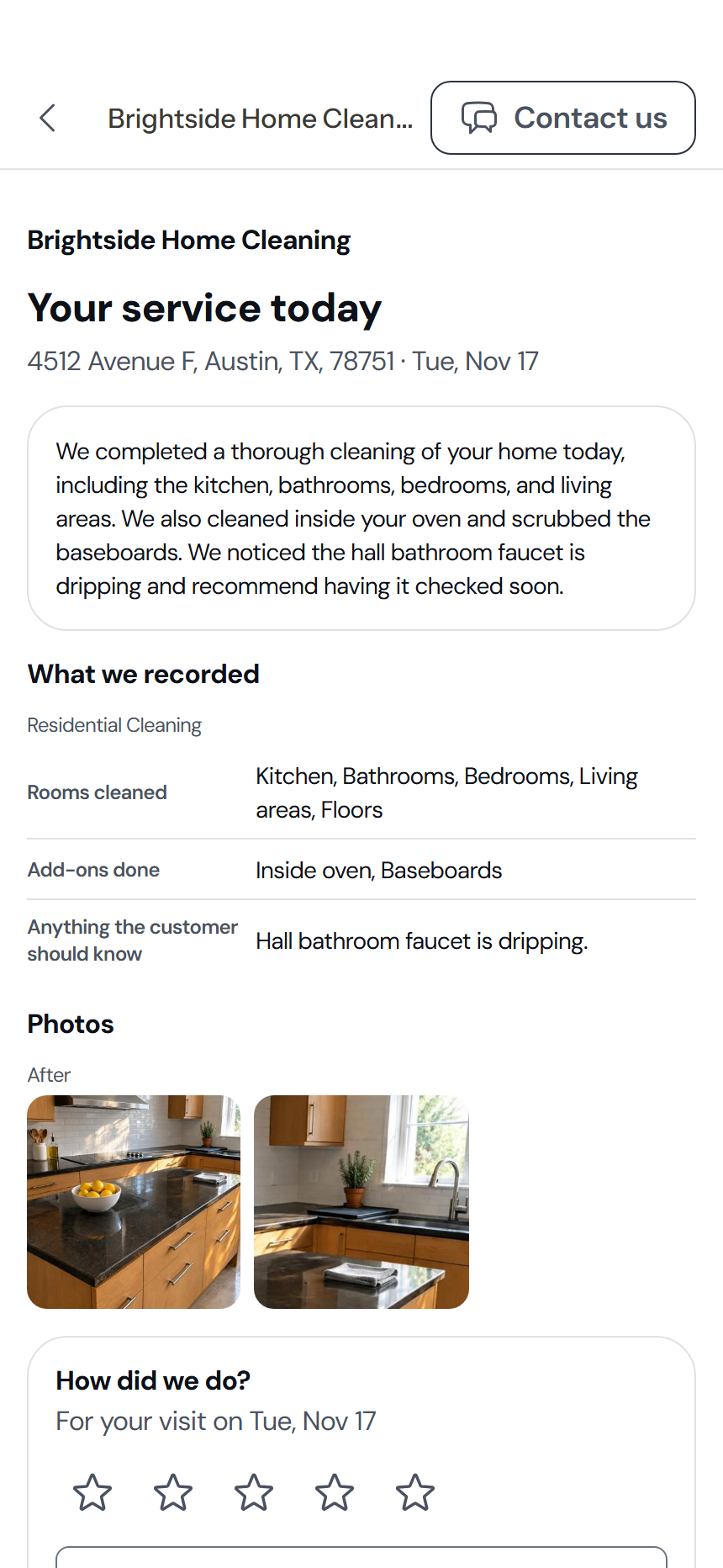
Your crew ticks Rooms cleaned and Add-ons done, adds a note under Anything the customer should know ("Hall bathroom faucet is dripping"), and takes the after photos.
-
12:05pm: the report.
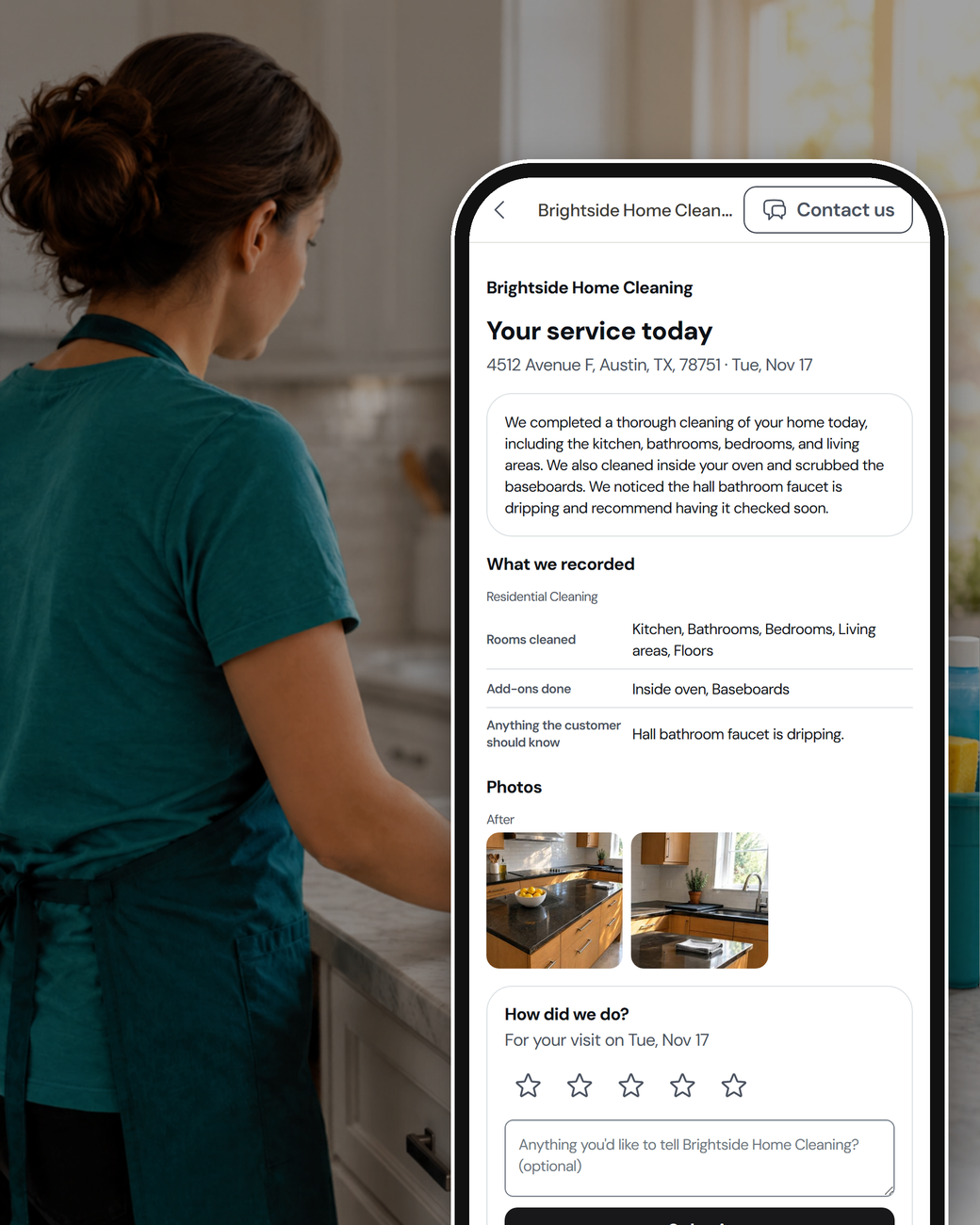
Mrs. Parker opens the service report from a text or email, at work, with no login. Your logo and business name sit at the top. Below that: a summary of the visit, the rooms and add-ons checked off, the faucet note, the after photos, and a star rating with room for a comment. The report also has a one-tap Leave a Google review link to your Google Business Profile.
-
Friday: the invoice.
You send the week's invoices in one batch. Hers carries your logo and your terms. She pays by card and adds a 20% tip in the same tap, or uses the Pay on Venmo button. Either way, you see it.
A quote a homeowner can say yes to.
A request page with your name on it.
Your contact form shows your logo and business name, at a link ending you choose, with a QR code for flyers and the car magnet. Every request becomes a lead and an assessment automatically.
Photos before the walk-through.
Send a link and the client sends pictures of the kitchen and bathrooms, with no account and no app.
One clear quote.
Put Deep Cleaning for the first visit and Residential Cleaning - Biweekly after it on one quote under your logo. Add a discount, your terms and a Valid until date, and ask for a deposit if you want one. The deposit goes out as its own invoice and comes off the first one. The client taps Approve or Decline.
Room by room, on the record.
Every Residential Cleaning service carries the Residential Cleaning checklist, along with Before photos and After photos:
- Rooms cleaned: Kitchen, Bathrooms, Bedrooms, Living areas, Floors, Other
- Add-ons done: Inside oven, Inside fridge, Interior windows, Laundry, Baseboards
- Anything the customer should know: a note that goes on the service report
Send the report with Include before photos on, and the client sees the before and after side by side. In a basement apartment with no signal, photos stay on the phone until your crew is back online to send them.
AI Assist turns your crew's notes into the summary the client reads, and the AI visit briefing, What you need for this visit, tells the crew what matters at that house. Need more on the record? The checklist builder has 8 question types, photo and signature among them.
Invoices and tips that don't feel awkward.
With your logo, online or on paper.
Every invoice carries your logo and business name, and the printed or PDF copy goes out on your letterhead. Keep your old invoice numbering if you have one.
Billed the way you sell it.
Bill per visit, or as a subscription billed weekly, monthly, quarterly, semi-annually or annually. Plan charges are added overnight, and ProBase tells you when invoices are ready to send. Then send them all at once.
Easy to pay, easy to tip.
- Card, through Stripe, with a tip of 15%, 20%, 25% or a custom amount
- Pay on Venmo, Cash App and PayPal buttons, plus a QR code, going to your own accounts. You mark those paid with a tap.
- Cash, check, Zelle or bank transfer, which you record
Terms and follow-up.
Choose Upon receipt, Net 7, Net 15, Net 30 or custom. Automatic late fees add a percentage once an invoice is past due, and the invoice warns the client first. Reminders and receipts go out with one tap. At tax time, export an accounting CSV of every charge, credit, tip and payment.
One page for the client.
The client portal shows your business name at the top of every page, with no login. Clients see upcoming and past visits, invoices and reports, pay, tip, approve quotes and reach you by call, text or email.
Behind the scenes: every client's week.
Every rhythm your clients want.
Weekly, Bi-weekly, Monthly, Every 2 months, Quarterly, Every 6 months, or any custom gap from 1 to 365 days. Repeat a client on set weekdays, like every Tuesday, or Monday and Thursday. Monthly means every 28 days, so it holds the weekday, not the date.
Changes without the reshuffle.
Drag a visit to another day or change its time. Cancel one visit, and Move to next visit carries its charges and notes forward. On a subscription, add a credit for the missed clean.
Routes and crews.
ProBase orders each crew's day by drive time, with a preview and Undo. Assign & optimize routes sends unassigned visits to the best-placed crew, and Rebalance this day evens out a lopsided one. Each crew gets working hours and a start and end location.
Who sees the client's details.
Crew Member (Limited) sees the day's homes, the entry notes and the checklist, without client phone numbers or money. Crew Member (Standard), Crew Chief, Manager, Admin and custom roles cover everyone else.
Who's paid.
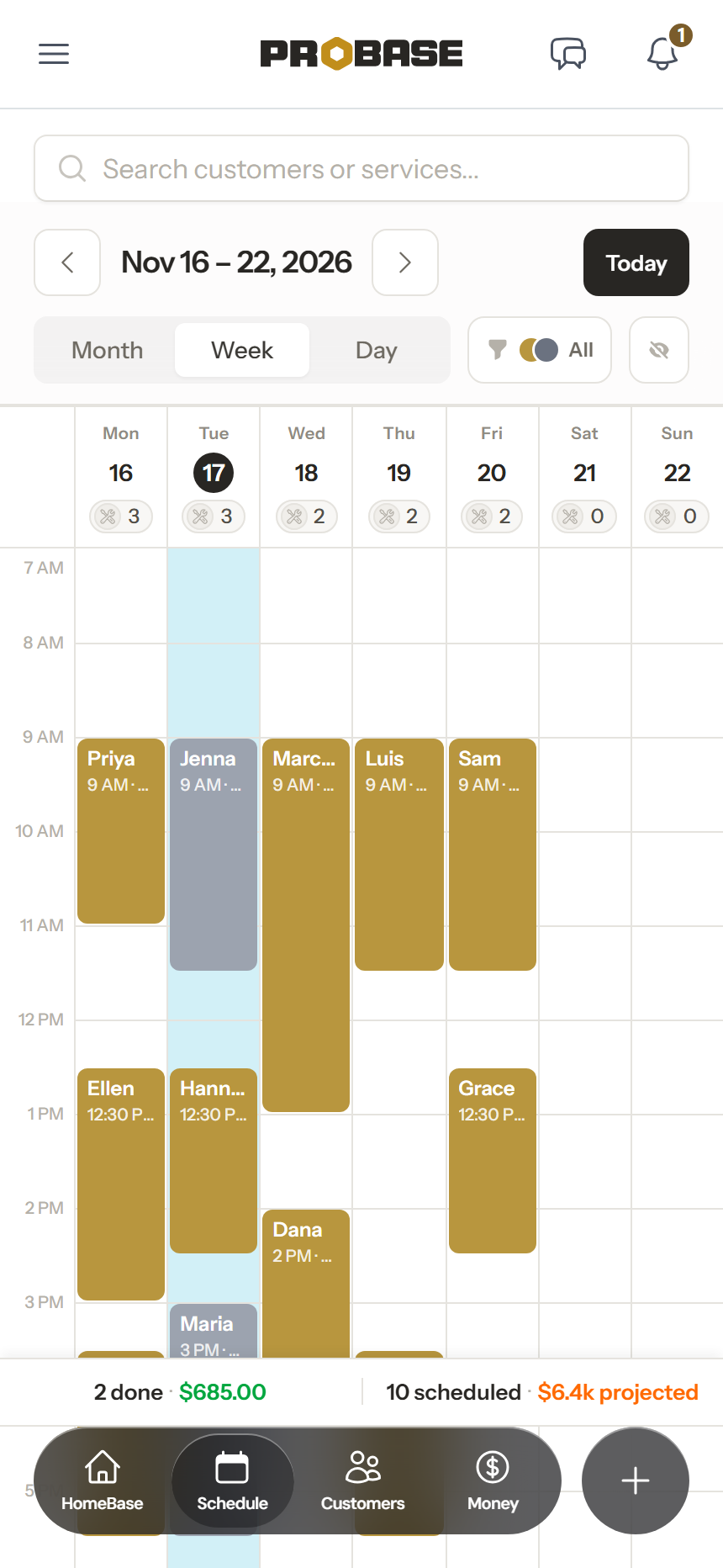
The revenue strip across the calendar shows what's done, projected and scheduled, and every invoice shows whether it's paid.
Your cleaning services, already set up.
Pick Residential Cleaning and your account starts with the three services a recurring cleaning schedule is built on, with Residential Cleaning - Biweekly as the default on every new job. Each service comes with a description, time on site, billing and frequency, and you set your own price. Add move-outs, add-ons and anything else you sell as services of your own.
Each service shows a published price range as a reference, with at least two dated sources. The sources are national cost guides, not ProBase prices, and your area may run higher or lower.
| Service | What it covers | Time on site | Billing | Repeats | Published range | Sources |
|---|---|---|---|---|---|---|
| Residential Cleaning - Biweekly | Dust, vacuum, mop, and clean the kitchen and bathrooms every two weeks | 150 min | Subscription, monthly | Bi-weekly | $150-$220 per visit, 3-bed/2-bath | Thumbtack, Oct 2026; HomeAdvisor, 2025 |
| Residential Cleaning - Weekly | Dust, vacuum, mop, and clean the kitchen and bathrooms every week | 120 min | Subscription, monthly | Weekly | $130-$200 per visit, 3-bed/2-bath | Angi, Oct 2026; Fixr, Jan 2025; HomeAdvisor, 2025 |
| Deep Cleaning | Top-to-bottom detail clean, including baseboards, fixtures and grime buildup | 240 min | Per visit | One-time | $200-$400 for a 3-bed/2-bath | Fixr, Jan 2025; Angi, Oct 2026; Thumbtack, Oct 2026 |
The ranges are for a 3-bed/2-bath home. ProBase doesn't price by bedroom or square foot. You set one price for each service and bill it per visit or by subscription.
Everything your cleaning business runs on.
Scheduling
Weekly, biweekly and set-weekday clients on one calendar, with pinned times.
Quotes and estimates
A request page and quotes under your logo, approved from the client's phone.
Checklists
Rooms, add-ons and notes on every visit, with before and after photos.
Customer management
Every client, home, entry note and dog note in one place.
Invoicing and payments
Invoices with your logo, sent in one batch, paid and tipped by card or the pay buttons.
Customer messaging
"On my way" texts that start with your business name.
Google reviews
A one-tap link to your Google Business Profile on every service report.
What makes ProBase different.
Your name on everything the client touches.
The request page, quote, report and invoice all carry your logo and business name.
The client sees the clean, room by room.
Rooms cleaned, add-ons done and after photos reach the client after every visit.
No cap, with three cleaners or thirteen.
No limit on cleaners, jobs or clients, no per-user fee, and no ProBase cut of your payments.
A founder who knows home services.
Founder Steve Corcoran spent 10+ years building LawnStarter to 500,000+ customers.
Compare the cost.
| Starting price | Free plan's cap | First year, 1 user | Adding cleaners | Free trial | |
|---|---|---|---|---|---|
| ProBase | $0/month | None. No limit on cleaners, jobs or clients | $0 | $0 | Not needed. It's free. |
| Paper and Venmo | Free | None | $0 | $0 | None |
| Maidily | Free: $0/month. Start: $29/month for 50 jobs | 10 jobs a month | $0 on Free; $348 on Start | Unlimited users on every plan. The price rises with jobs: Start adds $3/month per 50 extra | None needed for Free |
| ZenMaid | Starter: $19/month, up to 40 appointments a month. Pro: $39/month. Pro Max: $49/month (marked coming soon) | No free plan on the pricing page | $228 on Starter; $468 on Pro | The pricing page doesn't say. SMS charges not included | 14 days |
| Jobber | Core: $49/month for 1 user, or $29/month billed yearly | No free plan | $588 billed monthly; $348 billed yearly | Connect with 5 users: $199/month, or $149/month billed yearly. Extra users $29/month each | 14 days |
| Housecall Pro | Basic: $79/month for 1 user, or $59/month billed yearly | No free plan | $948 billed monthly; $708 billed yearly | Essentials, 5 users: $189/month, or $149/month billed yearly. Max adds users at $35/month each | 14 days |
Prices in US dollars, from each company's own pricing page on November 13, 2026. Promotional discounts not included.
Maidily's free plan lets you add every cleaner you have. The cap is on jobs. Jobber, ZenMaid and Housecall Pro are good software, with features ProBase doesn't have. If you need online booking, autopay or payroll, pay for a tool that has them. If you need clients scheduled, checked off and paid under your own name, with no cap on how many, that costs $0 here.
Full comparisons: Jobber vs ProBase · ZenMaid vs ProBase · Spreadsheets vs ProBase
Is ProBase right for you?
Built for:
- Solo house cleaners and maid services running 1-5 crews
- Recurring weekly, biweekly and monthly homes, plus deep cleans
- Cleaners who want clients to see a report and an invoice with their own name on it
- Cleaners coming off a paper calendar, a spreadsheet or Venmo requests
Not designed for:
- Online booking, where clients pick their own slot
- Autopay or charging a card on file
- Clock-in, timesheets or payroll
- QuickBooks or Xero sync
- Custom brand colors, a custom domain or white-labeling
- GPS crew tracking
- Franchises and 20+ crews
Is carpet your main line of work? See carpet and upholstery cleaning software.
Answers to what house cleaners ask most.
Is ProBase really free for a cleaning business?
Yes. $0 a month, no trial, and no credit card, ever. There's no limit on cleaners, jobs or clients, no fee per cleaner, and no ProBase fee on payments. Card payments cost Stripe's standard 2.9% + 30¢. ProBase earns a share of jobs that pros choose to take through optional marketplace partnerships. You never have to take one, and your cleaning tools stay free either way.
Is there a free scheduling app for a cleaning business?
ProBase is one. Install it on your phone's home screen and it opens like an app, with no app store needed. The calendar, routes, checklists, photos and invoices all work from your phone, and the same account works on a laptop when you'd rather sit down to do billing.
Will my clients see my company name and logo?
Yes. Upload your logo in Settings, and your logo and business name appear on your request page, quotes, service reports and invoices. The client portal shows your business name at the top of every page.
How do new clients request a cleaning?
Through your contact form link. Every request becomes a lead and an assessment, and you set the day and time.
Can I schedule a client on set weekdays?
Yes. A client can repeat every Tuesday, or on Monday and Thursday. Monthly repeats every 28 days, so it keeps the same weekday. Pin the visit's time, and routing never moves it.
What if a client wants to skip a week?
Cancel that one visit. Anything already on it can move to the next visit, and if the client is on a subscription, you can add a credit for the week they missed.
How do clients pay?
From the invoice link, by card with an optional tip, or with the Pay on Venmo, Cash App or PayPal buttons. You can also record cash, check, Zelle or bank transfer.
How do I remind a client before a visit?
Tap to send it. ProBase texts it for you. Client replies come to the phone number on your business.
Where do keys, door codes and the dog go?
On the client's property. Add a Locked gate note for the gate code, key location or how to get in, and a Dog on property note for the dog. Your crew sees both on every visit to that home.
Is there a demo I can look around first?
Yes, inside your free account. Choose Explore a demo account on HomeBase to look around a sample home-services business with customers, jobs and routes already filled in. Your own account starts with your cleaning services.
Leave the paperwork as clean as the house.
Pick Residential Cleaning, add your logo, and send your next client a report they'll actually read.
Create My Free Account