Free handyman software · Every tool included
Every tool a pro handyman needs. None of the monthly bill.
Take requests, quote the whole list from photos, collect a deposit, schedule the week, time the work and get paid by card or Venmo, all in one free account.
No credit card · No trial period · Just free
Yes, it's actually free.
Handyman business software usually starts around $50 a month and climbs with every user. The free plans out there come with a ceiling: 30 jobs a month on one, 5 estimates or invoices on another.
ProBase is $0, with no cap. Send as many quotes and invoices as the work brings in, and add every customer you have. You get no trial clock, nobody asks for a card, and every feature below is open on day one.
ProBase adds no fee to your payments either. Card payments cost Stripe's standard 2.9% + 30¢, and the money lands in your own Stripe account.
The money comes from optional marketplace partnerships: ProBase earns a share of jobs pros choose to take through them. Taking one is never required. Read how the free model works.
You fix it right. The estimate says otherwise.
"Around $400, probably."
The customer asked for a price on nine things. You texted back a number from the driveway. They're comparing it to a two-page estimate from the company with the wrapped van.
Half up front, on the honor system.
The TV mount needs a $90 bracket you're buying with your own money. You asked for a deposit by text. It hasn't come.
Which house had the bad flapper valve?
You've been to 40 houses this year. The one with the running toilet called back. You don't remember the part or the price.
3:40pm, and how long was that?
You started at 9, ran to the hardware store for a hinge, came back, and finished after lunch. Now you're guessing the hours on the invoice.
Hard work isn't the problem. The setup is.
How it works.
Pick Handyman and add your logo.
Handyman is under Popular when you sign up, or type "odd jobs" or "home repair" and ProBase finds it. Handyman Visit - Hourly, Honey-Do List and TV Mounting load into your account, and Handyman Visit - Hourly is the default on new jobs. Upload your logo in Settings or from the Add your logo card on HomeBase. Setup takes about 5 minutes.
Bring your customer list.
Import it yourself from a CSV, a PDF, a text file, or photos of your paper notes, or ProBase will help you import it. AI sets up your customers, their services and prices, and any recurring visits on the schedule. You review each step before anything saves.
Quote it, fix it, bill it.
Send one quote for the whole list, do the work with the timer running, and send the invoice before you leave the driveway.
A text estimate vs. a ProBase quote.
| A text estimate | A ProBase quote | |
|---|---|---|
| Who it's from | A phone number | Your logo and business name at the top |
| What it covers | "The stuff we talked about" | Every fix on its own line |
| The price | One number | Each service priced, with a discount for the whole list if you offer one |
| How long it's good for | Until you change your mind | A Valid until date |
| Your terms | None | Your wording, shown on the quote |
| The deposit | "Can you Venmo me half?" | Due on approval, sent as its own invoice and taken off the first one |
| How they say yes | A thumbs-up emoji | Approve or Decline, with no login, and a reason if they decline |
Same handyman, same work. One of them looks like a company.
Quote the whole honey-do list.
This is handyman estimating software that works the way a list actually comes in.
The request comes to you.
Your contact form is a page with your logo and business name, at a link ending you choose, with a QR code for the truck door and the door hanger. Every submission becomes a lead and an assessment automatically, with the customer's own words attached.
See it before you drive.
Send a link asking for photos. The customer snaps the sticky door, the water stain and the wall where the TV goes, with no app and no login. You quote from your truck, not their kitchen.
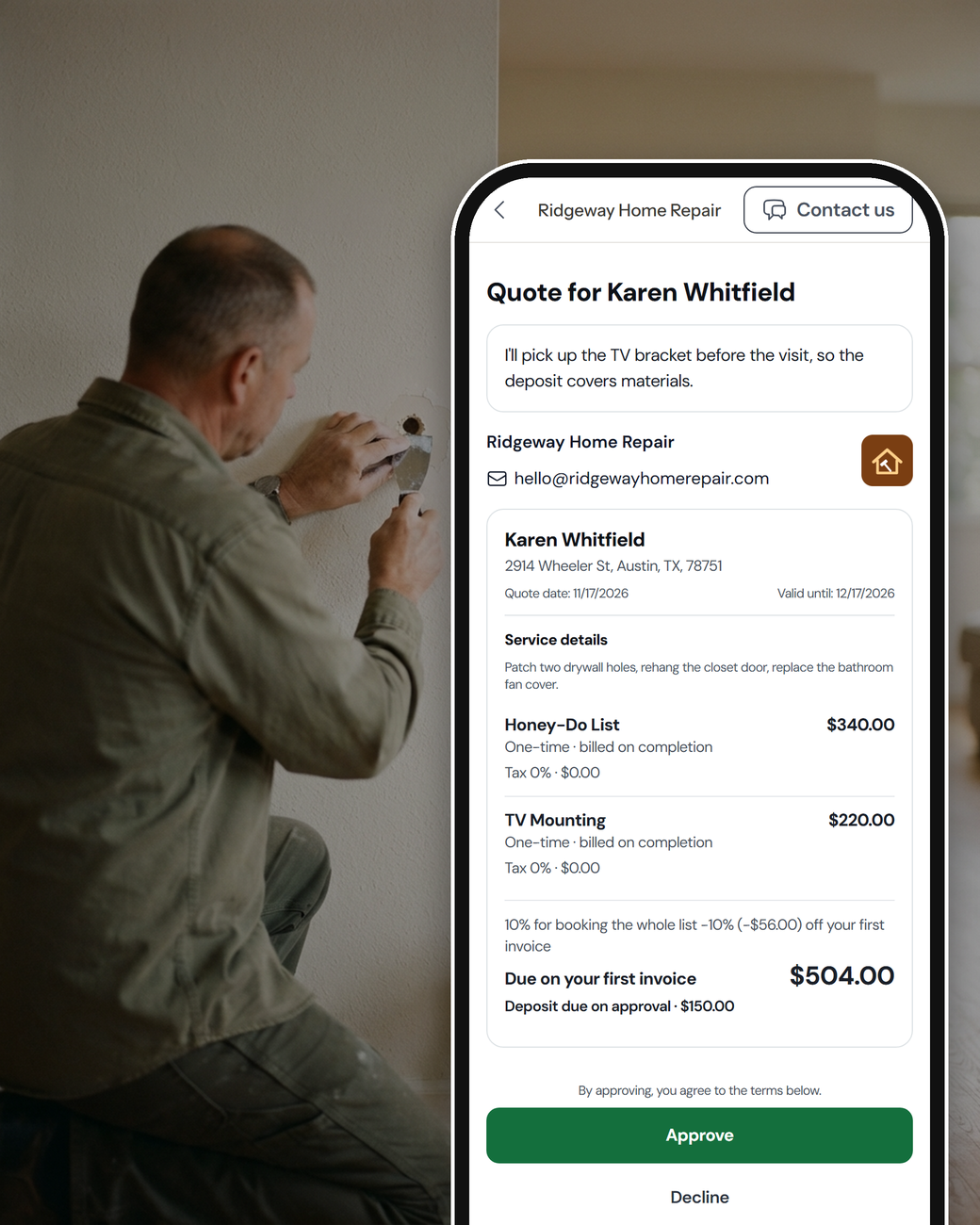
Put every fix on one quote. A quote can look like this:
| Line | What it covers |
|---|---|
| Honey-Do List | Patch two drywall holes, rehang the closet door, replace the bathroom fan cover |
| TV Mounting | 65-inch TV over the fireplace, cables hidden |
| Discount | 10% for booking the whole list |
| Terms | Your wording, shown on the quote |
| Valid until | The date the price expires |
| Deposit | Due on approval |
Every hour, on the record.
The visit timer runs Start, Pause, Resume and Complete. Pause it for the hardware store run and resume when you're back. Every press is written to the visit history, like "Started 9:02 AM by" your crew member's name, so the real time on site is in front of you.
The timer doesn't write the invoice. You read the time, set the hours on the invoice yourself, and add the hinge or the bracket as a charge on the visit. For hourly work, the Handyman Visit - Hourly service carries your rate.
A report that shows the fix.
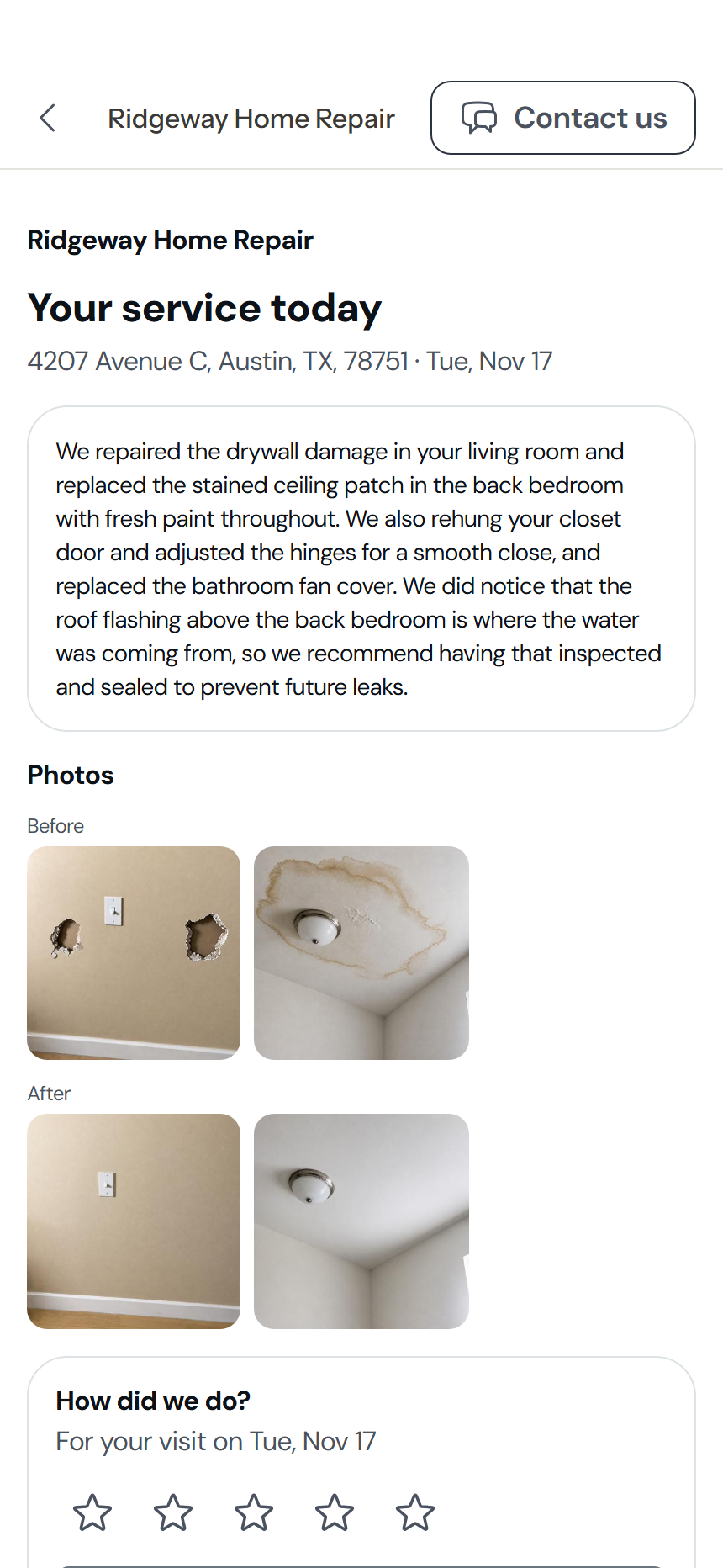
Every handyman visit carries Before photos and After photos: the water stain, then the patched and painted ceiling. The customer opens the service report from a text or email, with no login. It shows:
- Your logo and business name
- A summary of the job, written by AI Assist from your notes
- Before and after photos side by side
- Any balance due
- A star rating with room for a comment, and a one-tap Leave a Google review link to your Google Business Profile
On a job with no signal, photos stay on the phone until you're back online to send them. Want a checklist for the final walkthrough? The checklist builder has 8 question types, photo and signature among them.
An invoice with your name at the top.
Built from the job.
Your logo and business name head every invoice, online and on the printed or PDF copy, which goes out on your letterhead. The deposit is already taken off. Add charges for parts, credits, tax rates, or a $0 "No charge" line for the thing you fixed while you were there. Keep your old invoice numbering if you have one.
Terms for landlords and property managers.
Choose Upon receipt, Net 7, Net 15, Net 30 or custom. Automatic late fees add a percentage once an invoice is past due, and the invoice warns the customer first.
How customers pay.
- Card, through Stripe, with a tip of 15%, 20%, 25% or a custom amount
- Pay on Venmo, Cash App and PayPal buttons, plus a QR code, going to your own accounts. You mark those paid with a tap.
- Cash, check, Zelle or bank transfer, recorded by you
A page for the customer.
The customer portal shows your business name at the top, with no login. Customers see visits, invoices and reports there, and they can pay, tip, approve quotes and contact you.
Every job, every house, every dollar.
Every house on file.
Each property keeps its own notes and visit history. The Locked gate note ("Gate code, key location, or how to get in") and the Dog on property note travel with the house. A landlord with four rentals is one customer with four properties. The AI visit briefing, What you need for this visit, sums it up for the crew only.
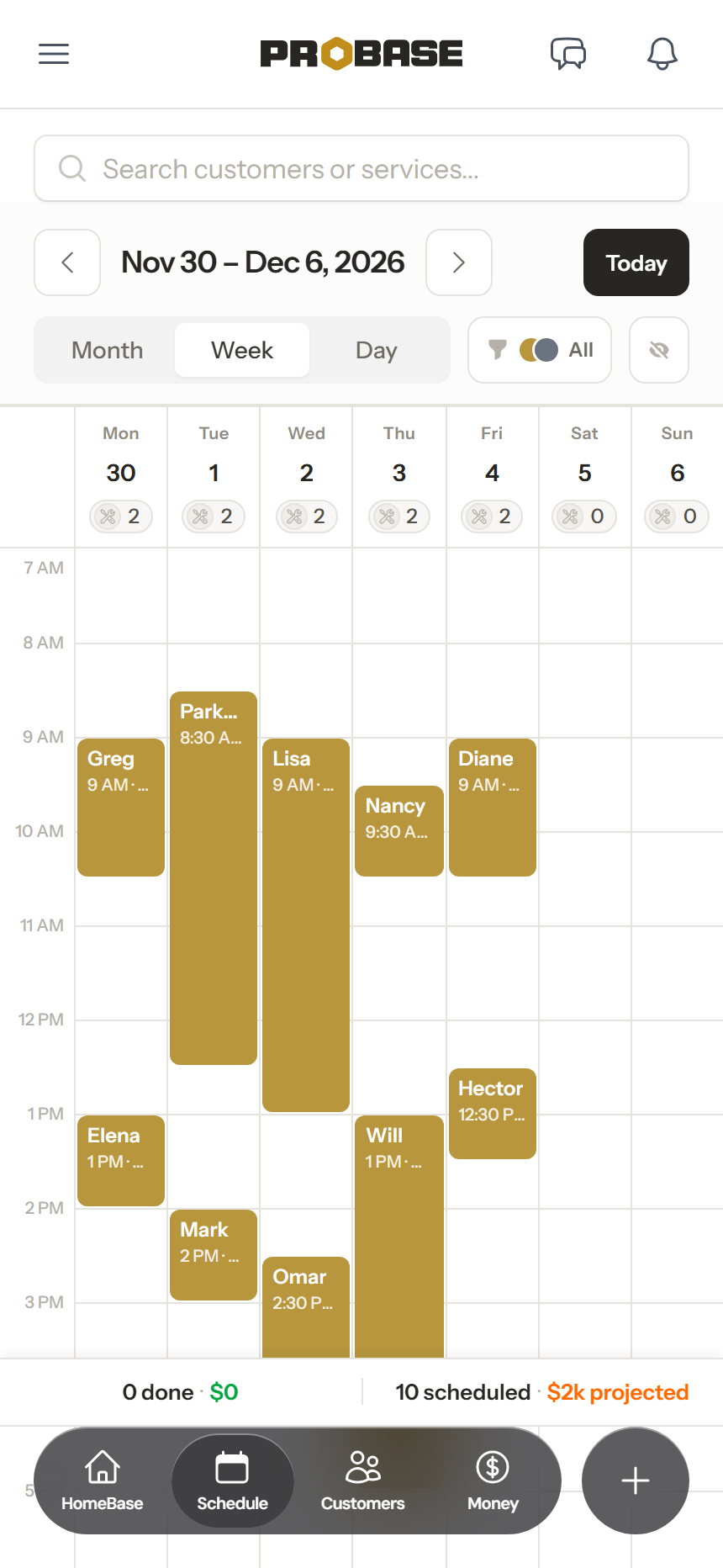
Every job on one calendar.
Most handyman work is one-off, so jobs land on a day, week or month view. Regulars can repeat on set weekdays or on a gap: Quarterly, Every 6 months, Monthly (every 28 days) or any custom gap from 1 to 365 days. Pin the customer who's only home after 3:00, and routing never moves that visit.
The route and the crew.
ProBase orders each crew's stops by drive time, with a preview and Undo. Assign & optimize routes sends open jobs to the best-placed crew, and a Recommended badge marks the shortest drive. Crew Member (Limited) sees the jobs and the notes, without customer contact info or money.
The "on my way."
Tap Text on my way. ProBase texts it for you. When ProBase sends it, the text starts with your business name and carries your phone and email. Texts are one-way, so replies come to you.
Every dollar.
Send every invoice at once, and send reminders and receipts with one tap each. The revenue strip shows what's done, projected and scheduled. At tax time, export an accounting CSV of every charge, credit, tip and payment.
Your handyman services, already set up.
Pick Handyman and three services are in your account from the start. Each comes with a description, time on site, billing and frequency, and you set your own price. Add drywall, doors, fixtures and anything else you sell as services of your own.
Each service shows a published price range as a reference, with dated sources. The ranges come from national cost guides and operators' posted rates, not from ProBase, and your area may run higher or lower.
| Service | What it covers | Time on site | Billing | Repeats | Published range | Sources |
|---|---|---|---|---|---|---|
| Handyman Visit - Hourly | Hourly help for small repairs and odd jobs around the home | 60 min | Per visit | One-time | $65-$100 per hour | Thumbtack, Jan 2026; operator rates, r/handyman, 2026 |
| Honey-Do List | Work through a list of small fixes in one visit | 240 min | Per visit | One-time | $315-$430 for a half-day visit | Thumbtack, Jan 2026; operator day rates, r/handyman, Oct 2026 |
| TV Mounting | Mount a TV level on the wall and tidy the cables | 90 min | Per visit | One-time | $125-$300 per TV, plus the bracket | Thumbtack, Oct 2026; HomeAdvisor, 2025; Fixr, Jan 2025 |
For hourly work, set your hourly rate as the price on Handyman Visit - Hourly. ProBase doesn't price by the hour on its own; you decide the hours on each invoice.
Everything your handyman business runs on.
Quotes and estimates
Photos first, then the whole list on one quote under your logo, with a deposit.
Invoicing and payments
Invoices on your letterhead, deposits applied, parts as charges, paid by card or the pay buttons.
Visit timer
Start, Pause, Resume and Complete, written to the visit history.
Service reports
Before and after photos under your logo, opened from a text or email.
Customer management
Several properties per customer, with gate and dog notes on each.
Scheduling and routes
One-off jobs and regulars on one calendar, in drive-time order.
Google reviews
A one-tap link to your Google Business Profile on every service report.
What makes ProBase different.
A quote that looks like you meant it.
Your logo, every fix on its own line, your terms, an expiry date and a deposit, approved from the customer's phone.
Your own demo.
Handyman is one of the few industries with its own demo account: a filled-in handyman business with customers, jobs and routes. Look around before you add a single customer.
Free whether you work alone or with a crew.
No per-user fee, and no ProBase cut of your payments.
A founder who knows home services.
Founder Steve Corcoran spent 10+ years building LawnStarter to 500,000+ customers.
Compare the cost.
| Free plan | Paid plans start at | Adding a helper | Free trial | |
|---|---|---|---|---|
| ProBase | $0, no cap on jobs, quotes, invoices or customers | No paid plans | $0 | Not needed. It's free. |
| Notes app and Venmo | Free | None | $0 | None |
| ServiceM8 | 1 user, 30 jobs a month, plus bonus jobs for accepting card payments. Proposals not included | Starter: $29/month, 50 jobs a month | Starter and up: unlimited users | 14 days |
| Contractor+ | Freedom: up to 5 estimates or invoices a month, up to 250 leads and clients | Pro Team: $58/month | Pro Team includes 2 users. Extra users $20/month each | 14 days on most premium features |
| Jobber | None | Core: $49/month for 1 user, or $29/month billed yearly | Connect with 5 users: $199/month, or $149/month billed yearly. Extra users $29/month each | 14 days |
| Housecall Pro | None | Basic: $79/month for 1 user, or $59/month billed yearly | Essentials, 5 users: $189/month, or $149/month billed yearly. Max adds users at $35/month each | 14 days |
Prices in US dollars, from each company's own pricing page on November 13, 2026. Promotional discounts not included.
A free plan with a cap works for a slow month. When the list fills up, the cap decides when you start paying. ProBase has no cap to hit.
Jobber and Housecall Pro are good software, and both do things ProBase doesn't. Housecall Pro offers 29 downloadable handyman templates and 7 handyman calculators, a service price calculator among them. If you need online booking, job costing or a QuickBooks sync, pay for the tool that has them. If you need the list quoted, approved and paid under your own name, that's $0 here.
Full comparisons: Jobber vs ProBase · Spreadsheets vs ProBase
Is ProBase right for you?
Built for:
- Solo handymen and handyman businesses running 1-5 crews
- Honey-do lists, small repairs, installs and mounting
- Landlords and property managers as customers, with several properties under one name
- Hourly and flat-price work, priced your way
Not designed for:
- Online booking, where customers pick their own slot
- Materials markup or job costing
- Permits, e-signature contracts or change orders
- QuickBooks or Xero sync
- Clock-in, timesheets or payroll
- Custom brand colors, a custom domain or white-labeling
- GPS crew tracking
Also pressure wash or clean? See pressure washing software and cleaning business software.
Answers to what handymen ask most.
Is ProBase really free for a handyman business?
Yes. $0 a month, no trial, and no credit card, ever. There's no cap on jobs, quotes, invoices or customers, no fee per user, and no ProBase fee on payments. Card payments cost Stripe's standard 2.9% + 30¢. ProBase earns a share of jobs that pros choose to take through optional marketplace partnerships. You never have to take one, and your tools stay free either way.
Is ProBase a handyman app?
It's an app for running a handyman business, not for hiring one or finding gig work. Install it on your phone's home screen and it opens like an app, with no app store needed. Quotes, the calendar, photos and invoices all work from your phone.
Does my logo go on the quote and the invoice?
Yes. Upload it once in Settings. Your logo and business name then head your quotes, invoices, service reports and your request page, and printed or PDF invoices go out on your letterhead.
How does the visit timer work?
It records every Start, Pause, Resume and Complete in the visit history, so the real time on site is in front of you when you set the hours on the invoice.
Can I put several repairs on one quote?
Yes. Add as many services as the list needs, plus a discount, your terms, a Valid until date and a deposit on approval. The customer approves or declines the whole quote from their phone.
What about the "maybe later" items?
Send them as a second quote. The customer approves the first one now and keeps the second for when they're ready.
How do I charge a trip fee or a minimum?
Add a trip fee as a charge line on the quote or the visit, or build your minimum into the price of the service.
How do I bill for parts and materials?
Add parts as a charge on the visit, at the price you charge the customer.
How does a customer approve a quote?
With one tap from their phone. Your terms are shown on the quote, and a deposit goes out on approval if you ask for one.
How do I get my numbers to my bookkeeper?
Export an accounting CSV of every charge, credit, tip and payment, plus a customer CSV, and send them over.
Is there a handyman demo?
Yes. Create a free account and choose Explore a demo account on HomeBase. It opens a handyman business already filled in with customers, jobs and routes, so you can try a quote before adding your own customers.
Send the kind of quote you'd want to get.
Pick Handyman, add your logo, and put the next honey-do list on one page with your name at the top.
Create My Free AccountWant to look around first? Explore the handyman demo inside your free account.